



September 21, 2016
There is no doubt that fiber optic cables play an integral role in telecommunication industry. Applications like data centers, local area networks, telecommunication networks, industrial Ethernet, and wireless network are all needing fiber optics to ensure smooth connectivity. Each application requires a specific cable design based on performance requirements, environmental conditions, and installation type. The common fiber optic cables like LC to LC patch cord cannot adapt to the harsh environment (e.g. moisture environment or underground deployment), thus water-resistant fiber optic cables are highly demanded on the market due to their water proof nature. Here is what you should know about the water-resistant fiber optic cable.
Overview of Water-resistant Fiber Optic Cables
Water-resistant fiber optic cable refers to the special type of fiber optic cable that are designed and specified for installations where the cable will come in contact with water or moisture, such as aerial, direct buried, or in conduit. The cables in these applications are exposed to or can be temporarily submerged in water, so they contain either a water-resistant gel-filled or gel-free (dry gel) polymer.
Generally, fiber optic cables can be divided into three types—outside plant cable (OSP), indoor/outdoor, and indoor, which are specified based on the environment and location where they are installed. With the exception of indoor cables, all cables contain water-resistant gel-filled or gel-free material to protect them from water and moisture. Before the use of gel-filled and gel-free materials, flooded core was another water-blocking method that is rarely used today (it has been replaced with gel-filled). The following image shows the gel-filled cables.
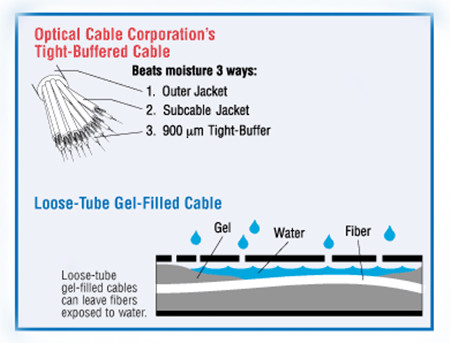
The gel is a gooey substance that must be removed when accessing and installing the cable. Gel-free cables, which are now more widely used, contain a super-absorbent polymer powder that is activated when it comes in contact with water or moisture. This blocks the water from penetrating the cable and allows for some expansion and contraction with temperature changes. Indoor cables do not contain water-resistant material since they are not typically exposed to water. Indoor (and indoor/outdoor) cables must meet additional flammability requirements dictated by local codes, such as the National Electrical Code.
Tight-Buffered & Loose Tube Cable Construction Provides Excellent Moisture Resistance
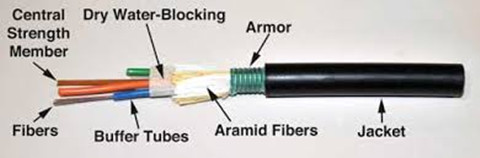
Water-resistant materials and cables are included in many industry specifications and standards. Generally, there are two basic water-resistant cable designs: Tight-buffer cables (primarily used inside buildings), Loose tube cables (used for OSP and indoor/outdoor).
It is known to all that most tight-buffered cable designs (seen in image below) are specified for indoor use, but some of them are designed with water-resistant powder and yarn, making them suitable for some indoor/outdoor applications. This tight-buffered cable utilizes an different design approach to deal with the moisture issue. Buffer materials are low-porosity plastics with excellent moisture resistance. This construction very effectively minimises the water molecule and OH-ion concentration level at the glass surface and virtually eliminates the stress corrosion phenomenon.
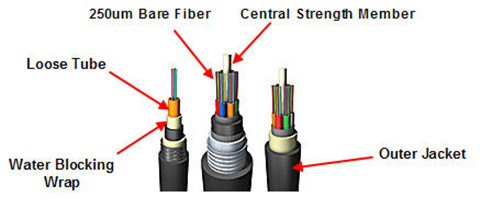
In loose tube cables (seen in image below), in order to prevent the water from reaching the 250μm coated fibers, the tubes surrounding the fibers must be filled with water-absorbent powder or gel that withstands high-moisture conditions, making them excellent for outside plant applications. This approach is especially made to waterproof the cable by filling the empty spaces in the cable with gel. The gel-filled tubes can also expand and contract with temperature changes, which makes loose-tube cable great for harsh, high-humidity environments where water or condensation can be a problem. However, gels can move, flow, and settle, leaves an uncertainty of the filled level of any particular point of a loose-tube gel-filled cable. Because loose-tube cable is typically 250 microns, you'll need a fan-out kit to build up the individual fiber strands to 900 microns when making the transition at the entrance point from outdoor loose-tube to indoor to tight-buffered cable.
The same level of protection remains in place all along the fiber, regardless of installation conditions, environment, or time. The balance of the tight-buffered, tight bound cable designs is such that it minimizes the open spaces available in the cable structure in which water can reside. Even if an outer cable jacket is cut, or water otherwise enters the cable structure, only a very small percentage of the cross-sectional area is open to water.
Conclusion
When selecting the suitable fiber optic cables, one must consider the application, the installation location, and the appropriate cable design and type according to specifications and standards. The water-resistant optic cable is specially made for moisture environment to insure the smooth connectivity. However, whether to have the loose tube fiber optic cable or tight buffered cable, it depends on the installation location.
Posted by: angelina at
03:02 AM
| No Comments
| Add Comment
Post contains 779 words, total size 6 kb.
September 19, 2016
Fiber optic cabling usually utilizes ruggedized jackets to ensure optimal performance in the face of extreme temperatures; exposure to UV/sunlight, oil, and solvents; and crushing impact, which makes it the ideal solution in any industrial environment where high-speed, high-bandwidth data solutions are needed. It can be used for campus and in-building data backbones to anchor an operation’s Ethernet, and also for point-to-point digital signal transmission. Today’s article will make a brief introduction to the basics of industrial fiber optic cable.

The Advantages of Fiber Optic Cable
Compared to the conventional copper wires, fiber optic cables are smaller and lighter than copper cables, extremely durable and intrinsically safe, with no risk of spark hazards. In addition, the following part lists several detailed information about the benefits of fiber optics.
- Higher carrying capacity—as the fiber optic cables are thinner than copper cables, more fibers can be bundled into a given-diameter cable. This allows more data information will be be carried across the network without interruption.
- Less signal degradation—it is known that the loss of signal in optical fiber is less than in copper wire.
- Lightweight—An optical cable weighs less than a comparable copper wire cable. Fiber-optic cables take up less space in the ground.
- Flexible—Because fiber optics are so flexible and can transmit and receive light, they are used in many flexible digital applications.
Types of Fiber Optic Cables
Fiber optic cabling can be segmented based on design criteria and installation environment:
Loose tube cables lay thinly coated fiber strands into unitized thermoplastic tubes, giving the fiber strands flexibility to move within the tubes and the cable, which makes it possess the ability to stand up to outdoor temperatures and harsh environments. Although loose-tube gel-filled fiber optic cables are used for high-fiber-count, long-distance telco applications, they are an inferior design for the Local Area Network applications where reliability, attenuation stability over a wide temperature range and low installed cost are the priorities.
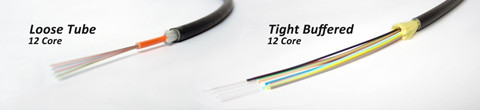
Tight buffered cables contain an individual buffer on each fiber stand, allowing for easy handling and quick termination. For common small fiber counts, this design delivers a smaller cable diameter than loose tube cables and is best suited for indoor environments. The most common designs for tight buffered cabling are distribution and breakout. For applications like moderate distance transmission for telecom local loop, LAN, SAN, and point-to-point links in cities, buildings, factories, office parks and on campuses. Tight-buffered cables offer the flexibility, direct connectability and design versatility necessary to satisfy the diverse requirements existing in high performance fiber optic applications.
Singlemode and multi-mode cables are another common types of fiber optic cables. Single-mode fiber strands are designed to interface with laser optic light sources for distances beyond 300 meters, while multi-mode strands or MM fiber patch cords are designed to interface with LED and vertical-cavity surface emitting laser (VCSEL) light sources for short-distance cabling runs.
Considerations When Installing Fiber Optic Cables
If you are considering using fiber optic cables in your installation, take a moment to review the installation guides. Firstly, for industrial installations, it is critical to consider and evaluate the environment. Additionally, as the fiber optic cables are more susceptible to damage during the stress of installation, therefore there are two specifications for bend radii—Bend Radii before installation and Bend Radii after installation. All hardware and support structures should follow the recommendations of TIA-569 and NECA/BICSI 568 Standards documents. Last but not the least, use cable management straps or cable ties to support cable bundles. Make sure these implements are fastened snugly, but not tightly around cable bundles.
Conclusion
There is without saying that the advent of fiber optic cable solutions has been one of the best things to happen to technology in recent years. With the demand on technology ever-increasing, fiber optic cables are becoming the preferred method of transmission over traditional coaxial solutions.
Posted by: angelina at
02:42 AM
| No Comments
| Add Comment
Post contains 642 words, total size 6 kb.
September 14, 2016
Cat 5e or cat 6 cables now are the mainstream of the copper network solution, but optical technology are progressing to promote higher category copper cables for the increasingly heavy-loaded data center solution. Cat 8 cables lately has been much talked about, especially after the TIA category 8 cabling standard approved. Category 8 is regarded as the next-generation twisted-pair cabling specification for higher data rate, but it is still under development. Here is what we need to know about the basics of Cat 8 cabling.
Main Features of Category 8 Standard
Cat 8 cable is especially designed to support 25G or 40G Ethernet data rate with a link distance of up to 30 meters, which is sufficient for most switch-to-server connections for top-of-rack (ToR), middle-of-row (MoR) or end-of-row (EoR) topologies. In addition, category 8 cabling is fully backward compatible with category 6A cabling, including RJ45 connectivity, and supports all Category 6A applications such as 10GBASE-T for a distance of 100 meters.
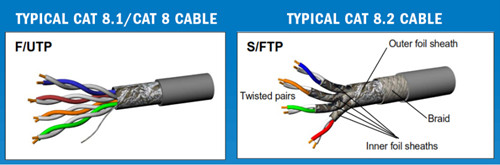
Category 8 cabling and components are specified with transmission performance of up to 2 GHz (four times the bandwidth of Category 6 cabling and two times the bandwidth of category 7) with more stringent alien crosstalk requirements. Meeting these requirements requires a shielded cabling system (F/UTP, S/FTP or F/FTP), just as seen in the above picture. What’s more, the cat 8 cables do not need more power to operate over shorter distances for 25GBASE-T/40GBASE-T application. The power needed to transmit a signal 30 meters at 40 Gb/s is approximately the same as the power needed for 10GBASE-T transmission for distances up to 100 meters.
How to Compare Category 8 to Those of Previous-Generation Twisted-pair Cabling Systems—Category 5, 6, 6A, 7, 7A?The cat 5e cables was introduced in 1999 with the use of 100-meter, 4-connector channel in structure cabling. The primary differences between category systems is the frequency at which the signal is transmitted over the cable. Cat 6 cables are designed to support 10Gbqs with a frequency of 500 MHz. While Category 7/7A as n advanced version of cat 6 cables offers a 100-meter 4-connector channel using shielded cabling, and has been designed to transmit signals at a frequency of 1000 MHz. Even though Category 7/7A operates at the higher frequency, there is no corresponding improvement in data rate over Category 6A because 10GBase-T is still the fastest twisted-pair-based data rate recognized by IEEE 802.3.
Category 8 is a significant departure from previous systems in that it uses a frequency of 2000 MHz, and is limited to a 30-meter 2-connector channel. Unlike Category 5e or Category 6A, which could use either unshielded twisted-pair (UTP) or shielded cable construction, Category 8 will require shielded cabling. The most likely cable construction for Category 8 will be 22-AWG S/FTP cabling. Category 8 is also unique in that the ISO standard will recognize two different classes of product. Class I is based on the traditional RJ45 connector, while Class II will accept non-RJ45 connectors similar to Category 7/7A. While both solutions will offer backward compatibility in terms of transmitting the lower category data rates (1G or 10G), the Class I solution offers a migration path using the RJ45 connector platform. For example, a customer might install a Category 8 jack-to-jack link now, but continue to use Category 6A patch cords until the active equipment is upgraded.
Given Category 8’s Capabilities, Where Is It Most Likely to be Deployed?
Category 8 cabling is designed to support emerging IEEE 25GBase-T and 40GBase-T needed as server-to-access-switch interconnect applications. This need has been identified and available, or under development, over optical fiber links for longer reach (up to 500 meters), or twinax links for short reach (up to 7 meters).
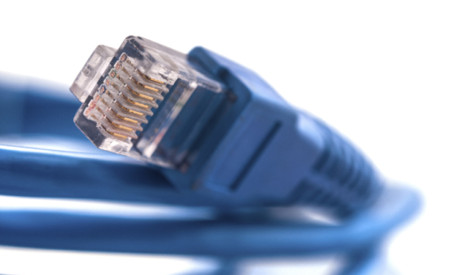
The opportunity for balanced twisted-pair as a cost-effective viable media option for the intermediate distance needs between 5 and 30 meters, sufficient to serve 20 cabinets or racks in a data center, led to the initiation and development of both the IEEE 802.3 application standards and the associated TIA as well as ISO/IEC Category 8 cabling standards.
How to Install Category 8 Cables?
Category 8 will be a shielded, field-terminable, and with a very high bandwidth. Thus there to be at least some improvements made to how jacks are terminated in the field to both meet this new bandwidth and to ensure a good bond with the shield. Additionally, contractors must make sure that the cable is properly grounded. If the connector companies do their job right, grounding the Category 8 cables and connectors will be a seamless process for the installer, which is all based on the RJ45 connector. Any component qualified as a Category 8 component will also meet requirements specified for Category 6A and lower components.
Conclusion
Cat 8 product recently is not available on the market now, but it is believed that in the near future cat 8 related items will be ubiquitous. Cat 8 cabling are meant to support 25GBASE-T and 40GBASE-T specifications, which will greatly propel the development of 25G and 40G network.
Posted by: angelina at
03:01 AM
| No Comments
| Add Comment
Post contains 839 words, total size 6 kb.
September 08, 2016
A switch is a telecommunication device that joins multiple devices within one Local Area Network (LAN). Choosing the proper Ethernet switch for the right application can be a confusing task as there are many options to be considered such as auto-negotiation features, managed or unmanaged, environment, future proofing, etc. Whether to use managed or unmanaged Ethernet switches for your data center solution is one of the key questions that users frequently put forward. To solve this out, today’s article will cover the difference between managed switch and unmanaged switch, as well as the benefits of using managed switches.
What Does a Switch Do?
Before we come to the differences between managed and unmanaged switch, we should first know exactly what an Ethernet switch is. As noted before, switch is a device mainly found in telecom field to interconnect Ethernet equipment. A switch receives a message from any device connected to it and then transmits the message only to the device for which the message is targeted. Additionally, the Ethernet switch is intelligent and efficient and can determine the target port for each frame. Managed and unmanaged switches are the two common switch types. The following chart shows the major differences between these two switches.
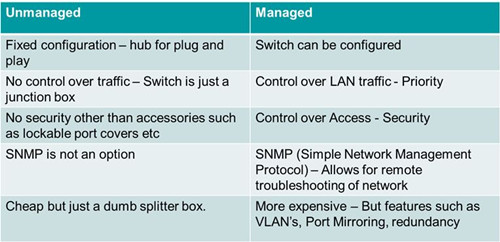
The major difference between them lies in the fact that managed switch can be configured and it can prioritize LAN traffic to make sure the most important information can get through. An unmanaged switch on the other hand behaves like a plug and play device. It cannot be configured and simply allows the devices to communicate with one another. Obviously the fixed configuration of unmanaged switches limits the functionality of a network to that of the Ethernet devices connected. That is the reasons why people would pay for more money to have a managed switch. Next part will go on to provide a clearer illustration to the benefits of using a managed switch.
Why to Use a Managed Switch?
Managed switch give you better control over LAN traffic and offer other advanced features to control the traffic.
- Redundancy
It refers to a back up data path to network traffic to safeguard a network in case a connection or cable fails. Managed switches incorporate Spanning Tree Protocol or STP to provide path redundancy in the network. This provides redundant paths but prevents loops that are created by multiple active paths between switches.
- Remote Management
Mission critical networks demand remote configuration, monitoring/traps, reboot, and re-imaging of OS. Managed switch use protocols such as SNMP or Simple Network Management Protocol for monitoring the devices on the network to realize remote management. The SNMP protocol allows you to relay network configuration data to network engineers and allow them to set configuration parameters remotely. This makes wire management and optimization functions to be performed from a central or remote location, which will make network management easier and more straightforward and can reduce troubleshooting time and increase uptime.
- Security and Resilience
Limiting network access to trusted devices prevents users from setting up unauthorized sub-networks. Managed switches enable complete control of data, bandwidth and traffic control over the Ethernet network, allowing you to set IP/port restrictions on actual physical ports. This means you can setup additional firewall rules directly in the switch. In all, managed switches support protocols which allow operators to restrict and control port access, like the 802.1x port based network access control. In addition, managed switches support protocols to limit management plane access via user authentication such as RADIUS, LDAP and others.
- Support Multiple VLAN Configuration
Managed switch can use the VLAN configuration to logically group devices as per the working departments and to isolate traffic between these groups. This segmentation and isolation of network traffic help to reduce unnecessary traffic. For instance, managed switches allow for the creation of multiple VLANs where 8-port switch functionally can become two 4-port switches (where ports 1-4 are VLAN 1 and ports 4-8 are VLAN 2). It’s possible to allow VLANs to talk to the router/NAT, while preventing them from talking to each other. You could lock down the wireless VLAN to only allow port 80/443 or similar so they can browse the web but nothing else.
- QoS (The Quality of Service)
The managed switches are able to prioritize one type of traffic over another allowing more bandwidth to be allocated through the network by assigning a higher priority to the critical traffic. This helps to improve network performance and helps in better transmission of delay-sensitive data such as real-time voice.
When and Where to Use Managed Switches?Managed switches possess all the above features, which are ideal for network applications with fast response time requirements at companies that need to allowing engineers to reach optimal reliable network performance and maintenance by managing and troubleshooting networks remotely and securely. These switches are robust and appropriate for Industrial Network settings, made to stand up to harsh applications like extreme temperatures (-40 up to +75), vibrations and shocks while contributing to a cost-effective, reliable, and secure network. Managed switches should be used on any network backbone switch so that segments of network traffic can be monitored and controlled such as: security/surveillance, defense/government applications, HVAC, water/waste water, utilities and oil/gas.
Conclusion
Managed switches are usually costlier than unmanaged switches, but it does offer many benefits for network control and configuration. This article has discussed a number of features found on managed switch, and introduce the major distinctions between unmanaged and managed switch. In the end, managed switches are supposed to be used on any network backbone switch so that segments of network traffic can be monitored and controlled, while unmanaged switches are the plug and play devices that are suitable for companies that has no advanced needs and limited budget.
Posted by: angelina at
02:32 AM
| No Comments
| Add Comment
Post contains 962 words, total size 7 kb.
32 queries taking 0.0326 seconds, 83 records returned.
Powered by Minx 1.1.6c-pink.

