



November 30, 2015
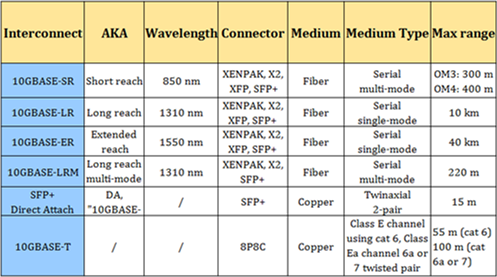
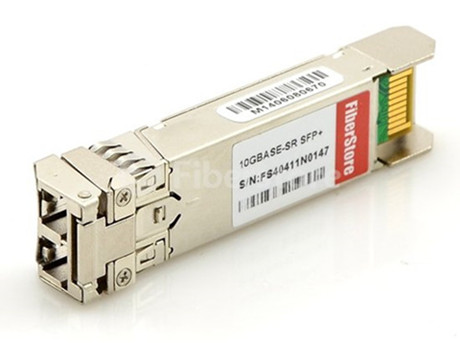
Introduction to SFP+ transceiver
Posted by: angelina at
04:09 AM
| No Comments
| Add Comment
Post contains 503 words, total size 6 kb.
November 25, 2015
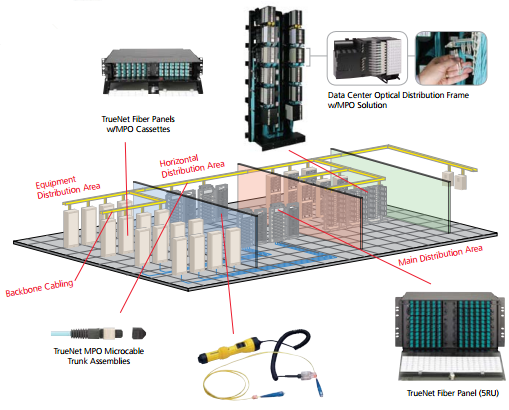
Fiber plug-and-play solutions for backbone and to the desk applications are a cost-effective and easy install option for mission critical applications such as Data Centers and Storage Area networks (SAN’s). Most fiber plug-and-play solutions operate at a high level of reliability and have considerable design flexibility. This is why it’s so important to have fiber plug-and-play solutions for data center applications. Here’s what you need to know about the top reasons of the topic.
Posted by: angelina at
02:23 AM
| No Comments
| Add Comment
Post contains 579 words, total size 6 kb.
November 24, 2015
SAN FRANCISCO - Despite Microsoft's CEO-led push to diversify its workforce, altering the global tech giant's largely white, male make-up remains a challenge.
The Redmond, Wash-based company released its latest workforce numbers Monday in a blog post written by Gwen Houston, Microsoft's general manager for global diversity and inclusion. In the U.S., the company remains two-thirds white, with Asians making up 29.3%, Hispanics 5.4% and African-Americans 3.5%. That compares to 2014 percentages, respectively, of 28.9%, 5.1% and 3.4%. Microsoft employs 115,000 people worldwide.
The number of women working for Microsoft globally dropped significantly from 29% to 26.8%, although the reason cited was a Microsoft's decision to write-down almost the entirety of its $9 billion purchase of Finnish handset maker Nokia, which resulted in some 8,000 layoffs.
"Even with this explanation, I want to emphasize that we are not satisfied with where we are today regarding the percentage of women in our workforce," writes Houston. "Our senior leaders continue to be deeply committed to doing everything possible to improve these numbers."
Microsoft CEO Satya Nadella has made it his personal mission to improve the company's diversity and gender equality numbers, a move that is in line with a growing realization by technology companies that their employee rosters do not represent the consumer demographics they're targeting.
Nadella told an audience at this fall's Salesforce Dreamforce convention that his company's culture is what "keeps me up at night," adding, "What’s a CEO's job? It’s about curation of culture. That’s my real job. The culture of a place is what defines its pursuit of excellence. The culture produces whatever you achieve in terms of greatness." His passion for the topic comes in the wake of a gaffe early in his tenure as CEO - when he told an interviewer that women wanting raises should just believe in "karma" - and a lawsuit brought against Microsoft by a former security expert who claims she was denied multiple promotions due to the company's stack-ranking system.
Earlier this fall, Microsoft pledged to spend $75 million to help improve computer science education in high schools around the country, something that's critical to increasing the so-called "pipeline" of potential tech workers. By 2020, there will be some 1 million unfilled computer programming related jobs in the U.S., according the Department of Labor.
Not surprisingly, the company's diversity numbers look best when examining non-technical roles, where 58% are male, 41% female, and 14% are Asian, 8% are Hispanic and 6% African-American. When it comes to workers in tech-related jobs, Microsoft is 83% male and 16.9% female, 35% of those being Asian, 3.9% Hispanic and 2.3% African-American.
One diversity bright spot for Microsoft is slight growth in the number of women in leadership ranks. The company reports that women on its senior leadership team is at an all time high of 27.2%, while pending shareholder approval next month women and minorities will hold five of 11 board positions. In addition, the number of African-American corporate vice presidents has gone from 1.3% to 2.9%.
Driving Microsoft on this inclusiveness front is a "greater awareness in general of the value and importance of diverse talent to the company," writes Houston. "We are focused on all stages of the pipeline. We and many of our peer companies are doing that, and we’re starting to see results. Definitely not as quickly as we would like, but we’re starting to move in the right direction."
Posted by: angelina at
08:16 AM
| No Comments
| Add Comment
Post contains 576 words, total size 4 kb.
November 20, 2015
Dramatic growth in data center has led to the increasing demand for higher-performance servers, storage and interconnects. As a result, people are seeing the expansion of higher speed Ethernet solutions, specifically 10 and 40 gigabit Ethernet. In particular to 10 gigabit Ethernet. IT managers are now faced with the challenge of selecting the appropriate 10-gigabit physical media—SFP+ or 10GBASE-T. From the following aspects, let’s make a comparison of these two options so that you can select the solution that best fits your needs.
With simpler electronics without block encoding, SFP+ also offers better latency—typically about 0.3 microseconds per link. 10GBASE-T latency is about 2.6 microseconds per link due to more complex encoding schemes within the equipment.
To sum up, lower power consumption and lower latency makes SFP+ well suited for large high-speed supercomputing applications where latency is a critical factor and where high port counts can add up to significant power savings
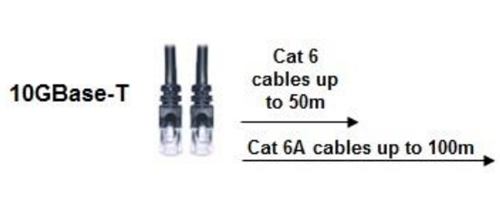
In addition, 10GBASE-T also has the advantage of being an interoperable, standards-based technology that uses the familiar RJ45 connector and provides backwards compatibility with legacy networks via autonegotiation. The ability to autonegotiate between 1 and 10 gigabit speeds allows 10GBASE-T server upgrades to occur on an evolutionary, as-needed basis. SFP+ solutions do not support autonegotiation and are limited with little or no backwards compatibility. Customers cannot just add SFP+ 10GbE to an existing RJ-45 1GbE infrastructure. New switches and new cables are required, which is a big chunk of change.
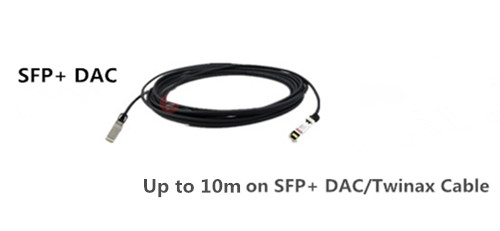
10GBase-T is likely to be used by clients who value cost over latency and power. 10Gbase-T allows clients to use low cost copper CAT6/6A cables with RJ45 connections for distances up to 100m. But for clients wanting low latency and low power consumption, they will use Direct Attached Copper (DAC) SFP+ cables for in-rack cabling and distances up to 7 meters.
Posted by: angelina at
03:23 AM
| No Comments
| Add Comment
Post contains 606 words, total size 7 kb.
November 16, 2015
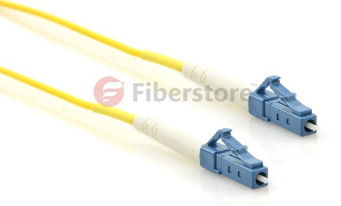
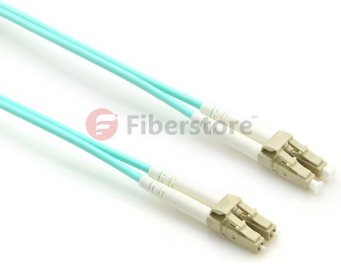
When talking about fiber optic patch cable, related products that firstly come to our mind are usually multi-mode and single-mode patch cable. However, there are many other types, such as simplex fiber patch cable, duplex fiber patch cable,LC to LC fiber patch cableand LC-SC fiber patch cable. People might wonder what duplex and simplex fiber patch cables are. In today’s text, we will introduce you about these cables. Before we come to simplex and duplex fiber patch cables, let’s firstly get familiar with the two words—simplex and duplex.
However, at other times, communications can flow in the reverse direction. That is half-duplex. Half-duplex system means a communication channel that operates in one direction at a time and may be reversible. A good analogy for half-duplex system will be two roads with a traffic controller at each end, in order to ensure smooth flow of traffic, the traffic controller only allows one direction at a time. But if one party transmits at the same time, a collision occurs, resulting in lost messages.
"Duplex†comes from "duo†that means "twoâ€, and "plex†refers to "weave†or "foldâ€. A duplex system has two clearly defined paths with each path providing information in only one direction, that is A to B over one path, B to A over the other. Compared with half-duplex, a full-duplex system, or sometimes called double-duplex allows communication in both directions and allowing this to happen simultaneously. Just like the cellphone, both parties can speak and be heard at the same time.
Posted by: angelina at
02:43 AM
| No Comments
| Add Comment
Post contains 455 words, total size 5 kb.
November 13, 2015
Microsoft is delivering a Windows 10 update Christmas present, to gamers and enterprise customers. Only a few months after Microsoft officially launched Windows 10, the company brings an update, which was announced in a Windows Blog post on Thursday.USA TODAY
NEW YORK—Microsoft started rolling out what the company characterizes as the first major update for Windows 10 on Thursday. The free release will mainly be enterprise-focused, bringing management and security tools to the IT professionals in your company.
But consumers are promised some benefits, too. Among other areas, Microsoft says that Windows 10 PCs running the new update will be able to cut boot times by as much as 30%, compared to a computer running Windows 7.
Windows 10 also finally arrives on the Xbox One video game console and soon select Windows Phones as well.
Indeed, under CEO Satya Nadella, Microsoft’s mandate for Windows 10 is built around the notion that Windows 10 apps will work across a whole slew of devices and things: phones, tablets, Internet of Things appliances, holographic experiences that materialize out of thin air — and yes, of course, traditional PCs, too.
The operating system, which formally launched at the end of July, is now actively in use on more than 110 million devices, Microsoft says, 12 million of which are business PCs. And that’s a key area of emphasis with this latest release.
For starters, Microsoft is unveiling Windows Update for Business, which lets IT staffers control when and how updates will be distributed and deployed within their organizations. Microsoft is also opening up a new Windows Store for Business, with companies choosing which apps, public or private, employees will be able to download. Companies can purchase software licenses in bulk at a discount, and manage such licenses through the store.
IT staff will also be able to manage the various privately owned Windows 10 devices that employees choose to bring to the office, reflecting the whole BYOD (Bring Your Own Device) trend.
Security is also getting a lot of attention, with what Microsoft corporate vice president of the Windows and Devices group, Yusuf Mehdi, calls "our strongest bucket.â€
Microsoft is also testing other data protection measures with the hopes of keeping corporate and personal data on given devices isolated and contained.
"Every week we see in the news another major data breach – costing organization’s productivity, customer’s trust and driving a real impact to their business,†Microsoft’s executive vice president of the Windows and Devices group Terry Myerson wrote in a company blog announcing the update. "We know these breaches often take 200+ days to detect, and we see the tremendous costs of them. Industry experts predict there will be over two million new malware apps by the end of the year. We designed Windows 10 to protect our customers from these modern threats.â€
In his blog post, Myerson thanked Daimler, NESTLE, KPMG, Hendrick Motorsports, Virgin Atlantic, and the PGA Tour, as companies that have collaborated with Microsoft on Windows 10. Microsoft is also receiving support from Box, DocSign, SAP, and Salesforce.
Among the other benefits for consumers is the ability for you to use a pen or stylus to scribble a note to yourself about an event, say, and have Microsoft’s Cortana recognize the phone number or email or street address in that note. Cortana can then send you appropriate reminders to get you to your appointment on time, maybe even by offering the option to book an Uber.
Microsoft says it has improved the speed and security in the Edge Web browser inside Windows 10, with such feature improvements as the ability to hover over a Web tab to get a preview of the underlying page. You’ll also be able to sync favorite sites and reading list items across devices.
And the company has made tweaks to the Mail, Calendar and Photos apps in Windows 10.
As for Xbox, Windows 10 also promises to speed things up and make your most-used content more readily available. But while the user interface on Xbox will also be updated, your actual gaming experience will remain very much the same.
Posted by: angelina at
09:17 AM
| No Comments
| Add Comment
Post contains 746 words, total size 6 kb.
November 11, 2015
As the core of optoelectronic device in the WAN, MAN or LAN application, fiber optic transceivers have developed various types along with the increasing in complexity. Take 10G transceiver module as an example, it has experienced developments from XENPAK, X2, XFP and finally realized with SFP+. Many users raised the questions related to the main difference between these optical modules. So, in the following part, we will provide some main tips about the difference among the XENPAK, X2, XEP and SFP +.
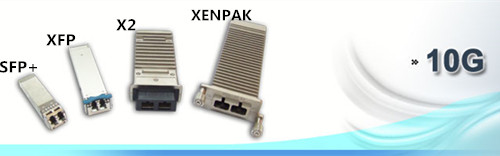
The first published XENPAK was by far the largest in physical size, which totally limited its popularity on the market. Many vendors then began to work on alternative standards. Finally in 2003, MSAs published another two 10G transceiver modules called X2 and XFP. X2 and XFP modules have been developed that support all of the high-power, long-distance applications once reserved for the larger XENPAK transceivers. But nowadays, SFP+ has gradually replaced the XFP and becomes the main stream of 10G transceivers markets. Why? The following part will answer you.
Both SFP+ and XFP are 10G transceivers, and can connect with other 10G transceivers. The main reason why SFP+ gain more market share than XFP is that SFP+ is more compact sized than XFP. The smaller SFP+ transfers the modulation functions, serial/deserializer, MAC, clock and data recovery (CDR) and EDC functions from the module to the motherboard on the card. In addition, cost of SFP+ is lower than XFP. Because XFP relies on a high-speed interface (10.3125Gbps), high-priced serializer/deserializer (SERDES) is required inside the switch to support it. They add an unacceptable cost to the base system of XFP. XFP complies with protocol of XFP MSA while SFP+ complies with IEEE802.3, SFF-8431, SFF-8432. SFP+ is the mainstream design currently.
Posted by: angelina at
02:54 AM
| No Comments
| Add Comment
Post contains 553 words, total size 6 kb.
November 06, 2015
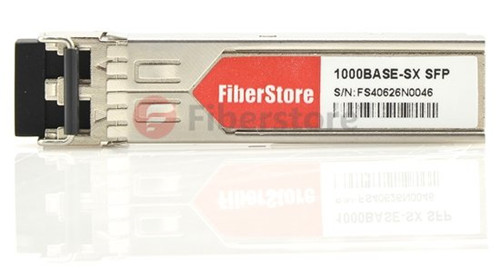
Transceiver modules can be classified into different categories based on several different criteria. Package, transmission distance, wavelength, work rate, fiber mode, and connector type are all the common characteristics used for defining fiber optic transceivers. The following is a brief introduction to some of the characteristics used in classifying transceiver modules.
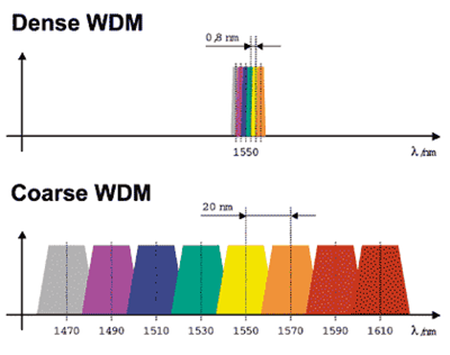
Recent telecom systems use wavelength-division multiplexing (WDM), either DWDM (dense WDM) or CWDM (coarse WDM). For the fiber optic transceiver modules, the common wavelength (see in below image) includes 850 nm, 1279 nm, 1310 nm, 1330 nm, 1490 nm, 1510 nm, 1550 nm and 1610 nm. In the CWDM system, the wavelength range is from 1270 nm to 1610 nm, 20nm as a wave band. In the DWDM system, the wavelength range is also from 1270 nm to 1610 nm, but 0.8nm as a wave band.
The half-duplex mode is used with a single transmission line that is used for both reception and transmission. The communication cannot occur simultaneously in the same direction. That’s why it’s called the half-duplex system.
Posted by: angelina at
02:37 AM
| No Comments
| Add Comment
Post contains 497 words, total size 5 kb.
November 02, 2015
With the massive applications of bandwidth-related products in telecommunication networks, people may encounter a dilemma of whether to deploy fiber-based or copper-based infrastructure. Limited budget always comes as an essential factor deciding people’s choice, under this circumstance, copper cabling or 1000BASE-T proves to be a nice and cost-saving method.
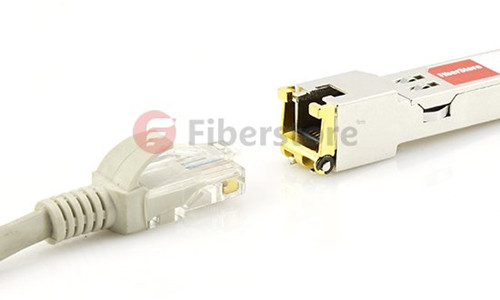
1000Base-T is a type of gigabit Ethernet networking technology that uses copper cables as a medium. 1000Base-T uses four pairs of Category 5 unshielded twisted pair cables to achieve gigabit data rates. The standard is designated as IEEE 802.3ab and allows 1 Gbps data transfer for distances of up to 330 feet.
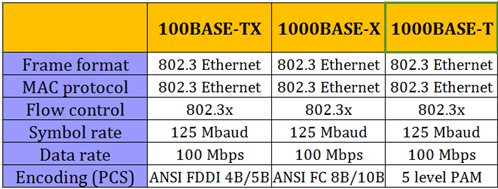
1000BASE-X supports multi-mode and single-mode fiber media and a short-reach, 25-meter copper jumper. As most of the cabling installed inside buildings today is Category 5 copper, the IEEE 802.3 1000BASE-T standard supports Gigabit Ethernet operation over the Category 5 cabling systems installed according to the specifications of ANSI/TIA/EIA-568A (1995). 1000BASE-T, however, works by using all four of the Category 5 pairs to achieve 1000 Mbps operation over the installed Category 5 copper cabling. 1000 Mbps data rates are achieved by sending and receiving a 250 Mbps data stream over each of the four pairs simultaneously.
In contrast, 100BASE-TX uses two pairs: one to transmit and one to receive. Fast Ethernet on Copper (100BASE-TX) achieves 100 Mbps operation by sending encoded symbols across the link at a symbol rate of 125 Mbaud. A 125 Mbaud symbol rate is required because the 100BASE-TX encoding scheme (called 4B/5B coding) has a bandwidth overhead of 20 percent, the difference between 100 Mbps and 125 Mbaud. Although 1000BASE-T uses a different encoding scheme (five level pulse amplitude modulation or PAM-5), because it maintains the 125 Mbaud symbol rate of 100BASE-TX, 1000BASE-T is backwards compatible with 100BASE-FX at the physical layer.
This compatibility feature is significant for network managers and planners because it means that forthcoming generations of 1000BASE-T NICs and switches will support both 100/1000 and 10/100/1000 autonegotiation between Fast Ethernet (100BASE-TX) and Gigabit Ethernet (1000BASE-T). These speed-agile products will enable network managers to deploy 1000BASE-T incrementally into the network.
Fiberstore Compatible 1000BASE-T Transceiver
1000BASE-T is a time-saving and cost-effective solution. Various products have been provided to enhance the 1000BASE-T performances.
Posted by: angelina at
06:27 AM
| No Comments
| Add Comment
Post contains 492 words, total size 6 kb.
32 queries taking 0.0362 seconds, 93 records returned.
Powered by Minx 1.1.6c-pink.

