



May 14, 2018
Vor kurzem, LWL-Kabel wird immer beliebter in der Telekommunikation wegen seiner großen Bandbreite, schnelle Geschwindigkeit, Fernübertragung und niedrige Kosten. Single Mode Fiber und Multimode-LWL-Kabel sind in vielen Netzwerken wichtig, um optische Signale zu übertragen. Obwohl Sie das gleiche Funktionsprinzip und Funktionen haben, hat jeder von Ihnen Ihre eigenen vor-und Nachteile.
Single Mode Fiber und Multimode Fiber Ãœbersicht
Personen, die mit optischen Netzwerken arbeiten, können mit Glasfaserkabeln vertraut sein. Und Sie können wissen, die grundlegende Struktur und Unterschiede zwischen Multimode Fiber und Single Mode Fiber. Hier ist eine einfache Tabelle mit den grundlegenden Kenntnissen von Ihnen.

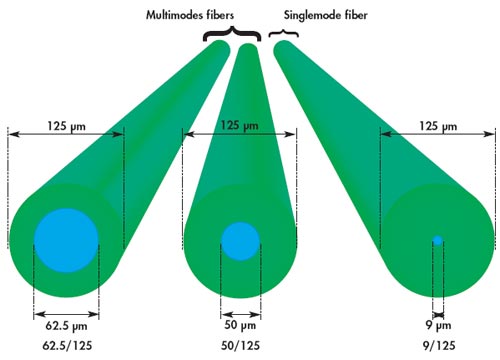
Von der Tabelle, die wir sehen können, hat Multimode-Fiber einen größeren Kerndurchmesser. Und es hat mehrere Übertragungsarten, aber Sie sind nur für Kurzstreckenverbindungen geeignet. Während Single-Mode-LWL-Kabel hat einen kleinen Kerndurchmesser, durch die nur ein Modus wird in der Regel 1310 oder 1550nm zu verbreiten. Aus diesem Grund sind diese Kabel oft in der Fernübertragung durch seine weniger Dispersion eingesetzt. Das folgende ist ein direkt-Anzeigebild zeigt die Durchmesser Unterschiede zwischen Single-Mode-LWL-Kabel-und Multimode-Glasfaserkabel.
Vor-und Nachteile von Single Mode Fiber
Wie oben erwähnt, ist Single-Mode-LWL-Kabel besser geeignet für lange Läufe Anwendungen im Vergleich mit Multimode-Glasfaserkabel. Mit Ausnahme dieser, Single-Mode-LWL-Kabel hat auch andere drei Vorteile.
- erhöhen Sie die Bandbreitenkapazität.
- begrenzte Datenstreuung und externe Interferenzen. Der Single-Input-Modus ermöglicht SMF die Lichtstreuung zu begrenzen, die wiederum reduzieren Lichtabfall und erhöhen Datenübertragungs Daten.
- schnelle Übertragungsgeschwindigkeit. Single-Mode-LWL-Kabel kann die Datenübertragung Geschwindigkeit bis zu 10 Gbps.
Jede Münze hat zwei Seiten. Single-Mode-Glasfaserkabel hat auch Nachteile. Die eine ist die Kosten. Obwohl es eine bessere Leistung in Long-Runs-Übertragung als Multimode-LWL-Kabel, Single-Mode-Glasfaserkabel oft mehr Kosten.
Vor-und Nachteile des Multimode-LWL-Kabel
Mit einem größeren Faser-Kern und gute Ausrichtung Toleranzen, Multimode-Faser-Kabel und Komponenten sind weniger teuer und sind leichter zu arbeiten mit anderen optischen Komponenten wie Glasfaser-Anschluss und Fiber-Adapter, im Vergleich mit Single-Mode-Glasfaserkabel. Darüber hinaus bietet Multimode-LWL-Kabel auch hohe Geschwindigkeit und hohe Bandbreite über kurze Strecken. Und Sie können mehrere optische Signale gleichzeitig übertragen.
Allerdings, Multimode-Fiber hat eine hohe Streuung und Dämpfungs Geschwindigkeit, die Qualität der optischen Signale wird reduziert, da die Übertragungsstrecke wird immer länger. Daher wird Multimode-LWL-Kabel häufig in Daten-und Audio/Video-Anwendungen in LANs verwendet.
Welche zu wählen, Single Mode Fiber-oder Multimode Fiber?
Besitzen, um Ihre eigenen Eigenschaften, Single-Mode-Glasfaserkabel und Multimode-Faser-Kabel haben verschiedene Anwendungsbereiche. Auf der Grundlage des Übertragungs-und Bereitstellungs Budgets ist das Multimode-LWL-Kabel, wenn der Übertragungsabstand weniger als 2km beträgt, besser, da es weniger teure optische Transceiver und andere Komponenten benötigt. Und wenn der Abstand über 2km ist, wird Single-Modus-Faser sein.
Posted by: angelina at
07:14 AM
| Comments (1)
| Add Comment
Post contains 411 words, total size 5 kb.
January 09, 2018
An Ethernet switch acts as a bridge to connect different parts of a network together. Although many routers also possess the network switching capabilities and multiple Ethernet ports, the Ethernet switch is not the replacement for routers. It is worth emphasizing that Ethernet switches are smarter than routers in that they operate at the data link layer (Layer 2) and the network layer (Layer 3) of the OSI Reference Model and therefore support any packet protocol. Ideally, switches will make better use of bandwidth if you prefer wired to wireless connections but have more devices than available Ethernet ports. On the other hand, an Ethernet switch is a costly way to expend the network in home or small business. So it is very important to invest an Ethernet switch with the appropriate number of ports to fit your needs. In the midst of various Gigabit Ethernet switches, a 24-port switch is considered as the most common Gigabit switch that connect devices in a local area network. Then this article will explore how to select a suitable 24-port Gigabit switch.
FS S3800-24F4S 24-port Gigabit switch comes with 20x 100/1000BASE SFP, 4x 1GE combo and 4x 10GE SFP+ slots. The flexible port combination form provide a high bandwidth aggregation connectivity for multiple switch in network to enhance network capacity. Moreover, it is a stackable SFP managed switch, which can provide true stacking of up to 4 switches in a stack acting as a single unit with totally 106 ports (96x 1G Ports and 10x 10G ports). The switching capacity is 128Gbps. This 24-port Gigabit managed switch fits for enterprise network operators who need high performance and low power processor to provide full speed forwarding and line-dormant capacity.
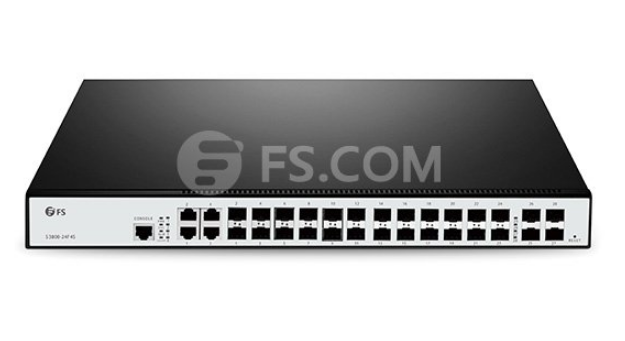
Figure 1: FS S3800-24F4S 24-Port Gigabit Switch
Cisco SGE2000P comes with 24 10/100/1000BASE-T RJ45 ports and 4 shared Gigabit SFP slots. This 24-port Gigabit managed switch can provide ACL (access control lists), DoS (denial-of-service), VLAN and IEEE 802.1X port authentication. And the enhanced quality of service (QoS) and traffic-management features help ensure clear and reliable voice and video communications. This Gigabit network switch enable you to take advantage of the comprehensive feature set for a better-optimized, more secure network.
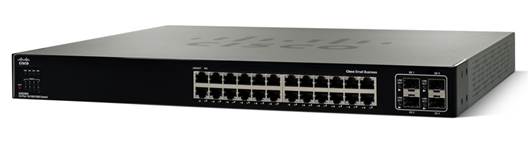
Figure 2: Cisco SGE2000 24-Port Gigabit Switch (Source: Cisco)
The Netgear ProSafe GS724T is armed with 24 copper 10/100/1000 ports and 2 SFP 100/1000 ports. Each port can transfer data at maximum throughput for a total maximum switching speed of up to 48 Gbps. This 24-port switch is intended for SMB organizations using the switch for applications like VoIP, video conferencing, and system security, etc. And it features a fanless system, allowing the switch to work silently without overheating. This is great for use on homelab, as its quiet operation won’t cause a distraction.
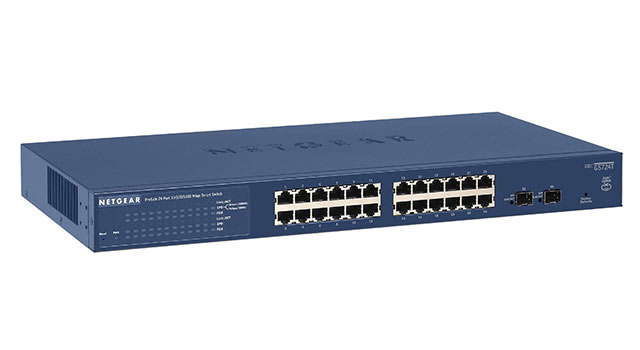
Figure 3: NETGEAR ProSAFE GS724T 24-Port Gigabit Switch (Source: NETGEAR)
The TP-Link TL-SG1024 features 24 Gigabit Ethernet ports and non-blocking switching, which can provide large file transferring and also be compatible with 10Mbps and 100Mbps Ethernet devices. Moreover, this network switch has 48Gbps switching capacity with 8K MAC address table, 10KB Jumbo Frame and 4MB buffer memory. This TP-Link switch is a fanless rack mount design with LED diagnostic lights, so you can easily tell which ports are in use. It can automatically adjust power consumption according to the link status to limit the carbon footprint of your network. The price is $69.99 on Amazon. So this fanless Ethernet switch is good for your wallet both because it is inexpensive to buy and because of its energy-saving technology.
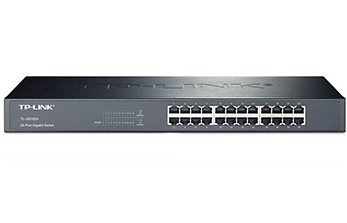
Figure 4: TP-Link TL-SG1024 24-Port Gigabit Switch(Source: TP-Link)
| Gigabit Switch Mode | Ethernet ports | Gigabit SFP | SFP+ Uplink ports | Switching Capacity | Forwarding Rate | Power Consumption | Price |
| FS S3800-24F4S | 24 | 4 combo | 4 | 128Gbps | 95Mpps | ≤60W(Full-loaded) | $449 |
| Cisco SGE2000 | 24 | 4 | / | 48Gbps | 35.7Mpps | 90W | $390 |
| NETGEAR ProSAFE GS724T | 24 | 2 | / | 48Gbps | No Information | 29W | $219.99 |
| TP-Link TL-SG1024 | 24 | / | / | 48Gbps | 35.7Mpps | 13.1W | $69.99 |
From the chart we can see, all the Gigabit switches listed above provide 24 port Ethernet RJ45 ports, only FS S3800-24F4S 24-port Gigabit switch has 4 SFP+ uplink ports. They have some characteristics in common that make them suitable for being used in places like home or small business office. In terms of the power consumption, TP-Link TL-SG1024 and NETGEAR ProSafe GS724T are lower than others, but the huge price spread exists between these two switches because NETGEAR ProSafe GS724T has another two SFP ports for more flexible application. Among these four switches, if you have no limited cost budget, FS S3800-24F4S is a good choice. It has more flexible port combination and higher switching capacity, that is why it may cost a little more than the other three switches. If you need stronger data transferring capability, FS S3800-24F4S is a better choice considering its forwarding rate. On the contrary, TP-Link TL-SG1024 is the best budget choice. If you want a fanless switch, NETGEAR ProSafe GS724T is an inexpensive and reliable choice, but the install program only works on Windows and the secure management is very difficult to be enabled.
When choosing a Gigabit Ethernet switch, the first factor to consider is how many devices need to be networked together. Purchasing a network switch with too few ports and not enough capacity will prove ineffective, and one that is too large can be a waste of money. Generally, small offices with a few employees should start with a 16-port switch, but a business that is looking to expand its operations soon needs a 24-port switch. So 24-port Gigabit switch is the most future-proofing and cost-effective choice in small business network. Except the above mentioned S3800-24F4S, FS.COM also provides other three cost-effective 24-port switch for different demands.
| FS.COM 24-port Gigabit Switches Mode | Description |
| S2800-24T4F | Fanless Gigabit managed switch with 24 100/1000BASE-T ports and 4 combo SFP slots |
| S3700-24T4S | Gigabit managed switch with 24 10/100/1000BASE-T ports and 4 10GE SFP+ uplinks ports |
| S3800-24T4S | Gigabit stackable managed switch with 24 10/100/1000BASE-T ports and 4 10GE SFP+ uplinks ports |
Related Article: 48-Port 10GE Switch Selection: What Is the Right Choice?
Posted by: angelina at
09:51 AM
| Comments (1)
| Add Comment
Post contains 1044 words, total size 11 kb.
January 06, 2018
An optical fiber cable uses light wave for voice and data transmission, its data transmission capacity is 4.5 times more than conventional copper cables. So in the past several decades, we have seen that fiber optic cables are superior to traditional copper twisted-pair cable or coaxial cable because of its unique physical characteristics, allowing information to travel at speeds increasingly approaching the speed of light without interference between adjacent wavelengths. In leading market, the global drive to implement FTTx into more new venues is good news for the market of optical fiber cables. Another good trend is that the price erosion of optical fiber cables had been 10 to 15 percent annually, in result that the demand of optical fiber cable is expected to continue growing in the foreseeable future. And the growing data transmission workloads placed by high-performance computers, servers and network storage systems is helping spur growth in the market. Consequently, fiber optic cables are now the indispensable backbone of today’s communication network. This article will analyse the global optical fiber cable market in three main applications, including long-distance communication, submarine cable and FTTx network.

According to the report "Fiber Optics Market by Cable - Global Forecast to 2021â€, the optical fiber cable market is anticipate to grow at a CAGR of over 9.8% during 2016-2021. The growing importance of cloud computing, data transfer & storage, and IoT is driving the use of Internet, which is driving the fiber optic cable market, as it acts as the backbone for data transmission. Moreover, growing technological advancements increase in number of connected devices and data centers are expected to positively influence global optical fiber cable market. In addition, next generation technologies such as LTE and FTTx, which require last mile connectivity, is expected to propel the demand for optical fiber cables in the coming years. All these factors have led to an increase in Internet users, which in turn has led to the higher usage of optical fiber cable to transfer information over the Internet, thus driving the fiber optics market.
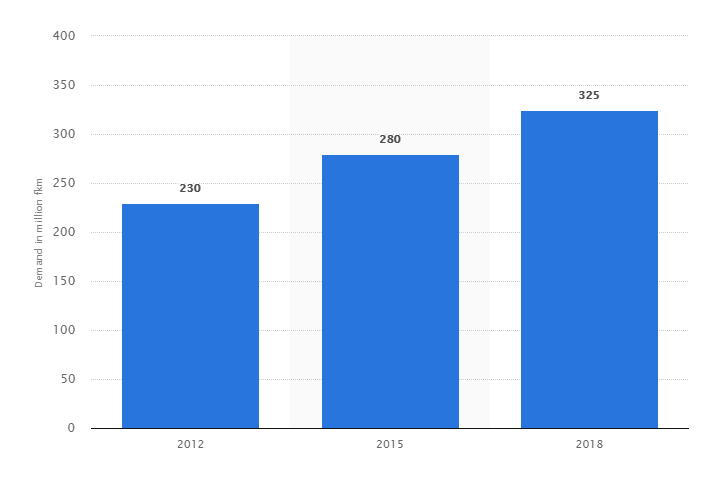
Global Optical Fiber Cable Demand from 2012 to 2018 (Source: Statista)
Currently, the growing adoption of optical technology in the telecommunications appears to be promising. Optical fiber has virtually unlimited capacity and low signal attenuation allowing long distances without amplifier or repeater, no exposure to parasite signals or crosstalk, and no electromagnetic interference (EMI). So fiber optic cable is especially advantageous for high-speed data transfer services in long-distance communications over electrical cabling. Furthermore, the increasing cloud-based applications, audio-video services, and Video-on-Demand (VoD) services further stimulate the demand for optical fiber cable installations.
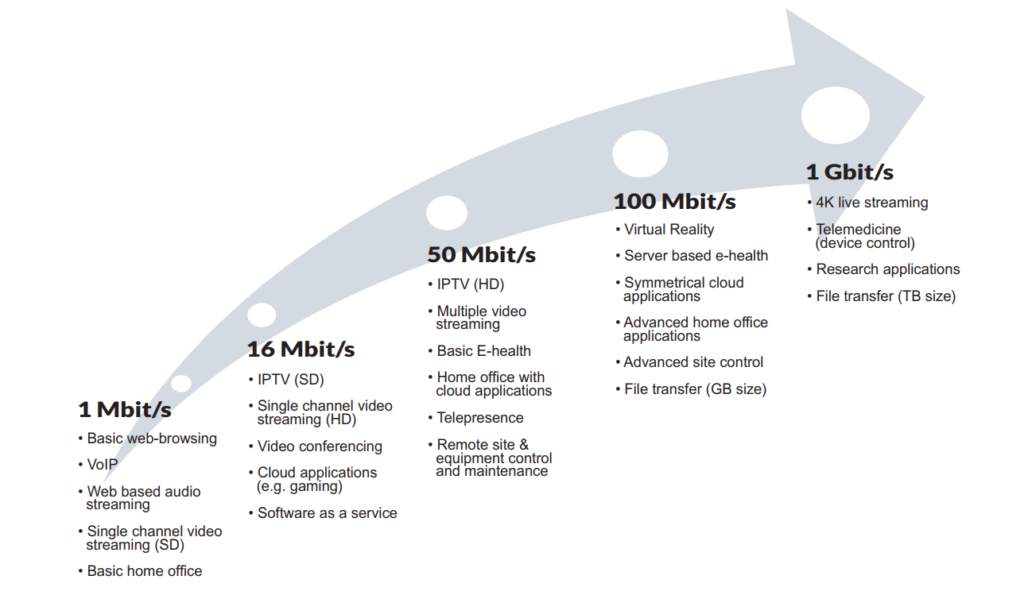
Growing Need for Capacity (Source: Goldmedia)
Submarine optical fiber cables are undersea cables used for carrying data across interconnected networks between continents. With the advancements of technology, most of the submarine optical fiber cables that currently form the backbone of the Internet connect the U.S. to Europe and Asia by crossing the Atlantic or Pacific oceans. Instead, there is a proposal for deployment of Trans-polar submarine cable system in Arctic Ocean. Laying an undersea fiber optic cable is meant to connect Asia and Europe by crossing the Arctic Circle - the shortest practical distance yet for Internet signals traveling between the two continents. According to the report by Global Industry Analysts (GIA), cumulative installations of submarine optical fiber cables globally are projected to reach 2 million kilometers by 2020, driven by the growing demand for fiber broadband and the ensuing deployment of fiber optic cables in the Internet backbone. Presently, submarine optical fiber cables transmit 100% of the international Internet traffic, and more than 95% of the world’s combined data and voice traffic.
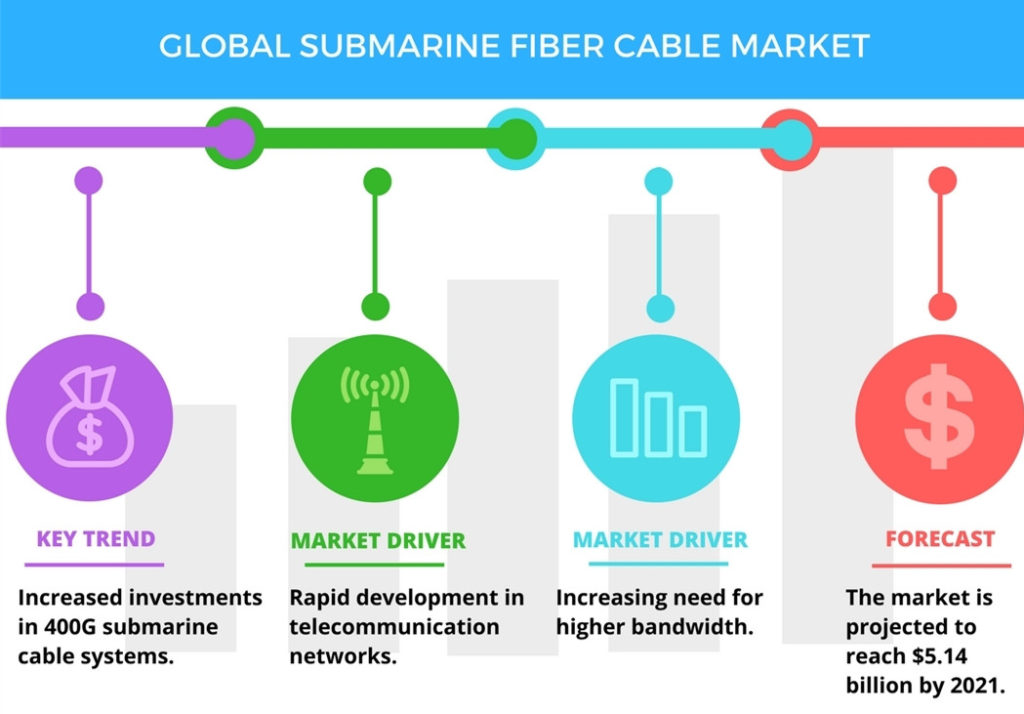
Submarine Optical Fiber Cable Market (Source: Technavio)
In recent years, the market for optical fiber cable has shifted dramatically to local deployments, away from long haul and regional. This is the impact of FTTx, which calls for far more dense applications in neighborhoods, cities and other highly focused areas. Optical fiber cable is being caught up in the global move to broadband in the near future. The next generation of high bandwidth applications, along with the proliferation of connected devices, is expected to require faster and higher bandwidth networks which will require the use of multimode fiber cable for data transfer. This growth in the FTTx networks in turn is expected to drive the fiber optics market. Future Market Insights (FMI) forecasts the global fiber to the home (FTTH) market's value will grow from $9.5 billion in 2017 to more than $37 billion by the end of 2027, a 14.4% compound annual growth rate (CAGR). In the leading Asian economies, more than 44% of all homes and buildings are already directly connected to the fiber optic cable network; in North America penetration is 8.4%, in Europe 5.6%.
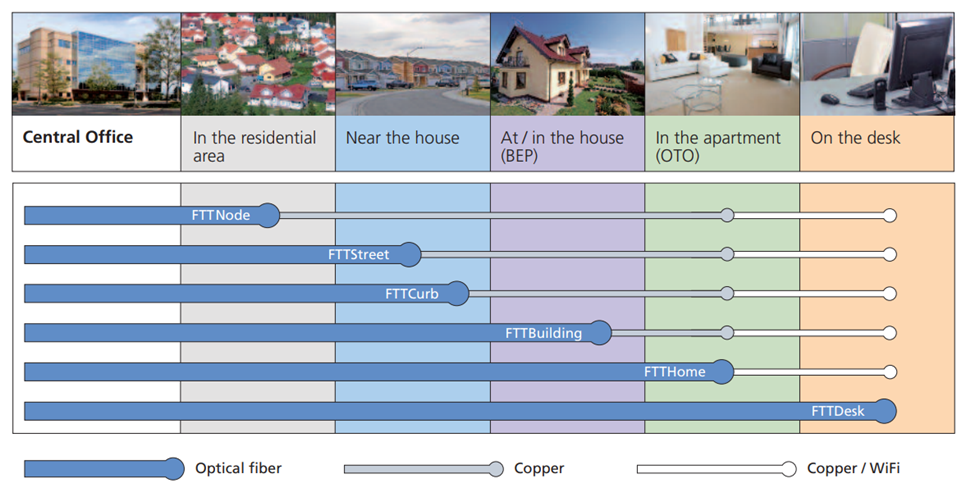
Fiber optic cable is widely used for data transmission and is increasingly being used in place of metal wires because of its efficiency and high transmission capacity. Since the use and demand for great bandwidth and fast speed, there is no doubt that fiber optic transmission will bring more opportunities and be continuously researched and expanded to cater for future demands. However, although fiber optic cable in itself is considered a long-term stable investment, it also faces huge challenge. The major restraint in the fiber optics market is the growing use of wireless communications systems in remote areas.
Related Article The Advantages and Disadvantages of Fiber Optic Transmission
Posted by: angelina at
01:08 AM
| Comments (1)
| Add Comment
Post contains 940 words, total size 8 kb.
December 13, 2017
SFP-GE-S-2 and GLC-SX-MM are Cisco 1000BASE-SX SFP multimode fiber transceivers. Since there are similar specifications for these two multimode modules, many end users may be confused when choosing a multimode fiber SFP LC connector SX transceiver for their Cisco switches. So, are they the same one? This post intends to give a simple explanation of SFP-GE-S-2 vs. GLC-SX-MM.
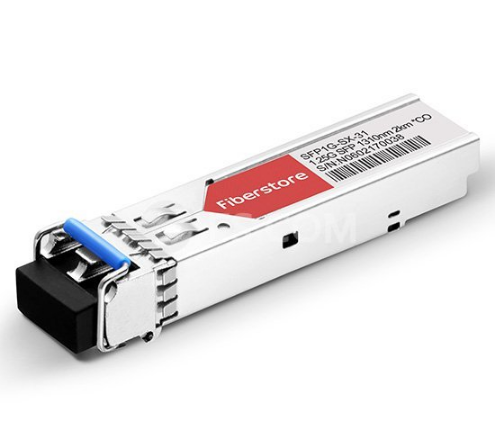
SFP-GE-S-2 Module
Cisco SFP-GE-S-2 is a 1 GbE SFP SX fiber transceiver that supports the maximum data rate of 1Gbps. It’s compatible with the IEEE 802.3z 1000BASE-SX standard, and can operate on standard multimode fiber optic link spans of up to 2 km.
| Module/Specs | Cisco SFP-GE-S-2 |
| Interface | LC duplex |
| Wavelength | 1310nm |
| Tx power | -9.5 ~ -3dBm |
| Receiver Sensitivity | < -17dBm |
| DOM Support | Yes |
| Temperature Range | 32℉to 158℉(0℃?to 70℃) |
| Data Rat | 1G |
| Fiber Mode | MMF |
GLC-SX-MM Module
GLC-SX-MM transceiver is also a Cisco 1000BASE-SX fiber transceiver that designed for Gigabit Ethernet applications. This SX module is compatible with the IEEE 802.3z 1000BASE-SX standard, and can operate on standard multimode fiber optic link spans of up to 550m.
| Module/Specs | Cisco GLC-SX-MM |
| Interface | LC duplex |
| Wavelength | 850nm |
| Tx power | -9.5 ~ -3dBm |
| Receiver Sensitivity | < -17dBm |
| DOM Support | No |
| Temperature Range | 32℉to 158℉(0℃?to 70℃) |
| Data Rat | 1G |
| Fiber Mode | MMF |
SFP-GE-S-2 VS. GLC-SX-MM
From the above specs comparison, we can learn that these two SX multimode modules support same data rate and operating temperature range. They all can operate on the multimode fiber optic cables. The main differences include:
- Wavelength
SFP-GE-S-2 can support a wavelength of 1310nm, whereas GLC-SX-MM works in 850nm.
- Transmission Distance
SFP-GE-S-2 can support up to 2km over laser-optimized 50 μm multimode fiber cable, while GLC-SX-MM can operate on legacy 50 μm multimode fiber links up to 550m.
- DOM Support
SFP-GE-S-2 can support DOM, but GLC-SX-MM does not have DOM function. DOM (Digital Optical Monitoring) is an important function available on fiber optic transceiver. It allows users to monitor parameters of modules, such as optical output power, optical input power, temperature, laser bias current and transceiver supply voltage. In real time, it offers users more convenience when using optical modules.
- Price
GLC-SX-MM is a legacy model, it doesn’t feature DOM function. It comes with the lowest price compared with other SX?modules . Take FS.COM compatible transceivers as example, SFP-GE-S-2 costs $ 11.00, while GLC-SX-MM is only $ 6.00.
Conclusion
From the contents above - SFP-GE-S-2 vs. GLC-SX-MM, we can draw a conclusion that?these two?SX multimode?fiber transceivers nearly can be used as the same one type module sometimes, but their existing differences still differ them from some applications. Most of the Cisco switches and routers support all two models, but please note, some of the switches require different models, you may visit Cisco SFP Compatibility Matrix for more detailed information.
Posted by: angelina at
06:20 AM
| Comments (1)
| Add Comment
Post contains 463 words, total size 6 kb.
December 06, 2017
Small Form-factor Pluggable (SFP) is a compact, hot-pluggable transceiver used for both telecommunication and data communications applications. It is also called mini-GBIC for its smaller size, which is the upgraded version of GBIC transceiver. These 1Gb SFP modules are capable of supporting speeds up to 4.25 Gbps. And they are most often used for Fast Ethernet of Gigabit Ethernet applications. It interfaces a network device motherboard (for a switch, router, media converter or similar device) to a fiber optic or copper networking cable. SFP modules are commonly available in several different categories: 1000BASE-T SFP, 1000BASE-EX SFP, 1000BASE-SX SFP, 1000BASE-LX/LH SFP, 1000BASE-BX SFP, 1000BASE-ZX SFP, CWDM SFP and DWDM SFP. These modules support different distance according to the different Gigabit Ethernet standard. Today’s main subject will discuss SFP 40 km vs. DWDM SFP.
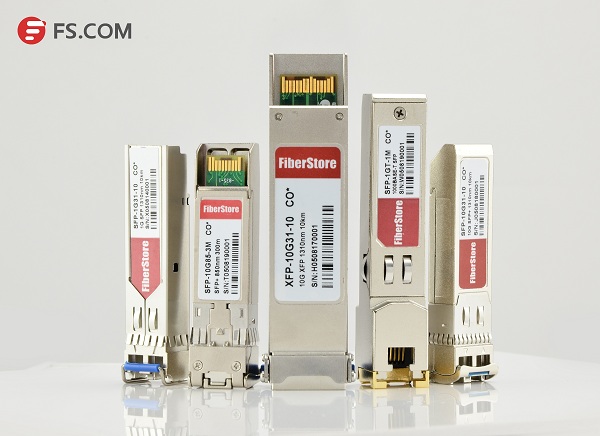
SFP 40 km
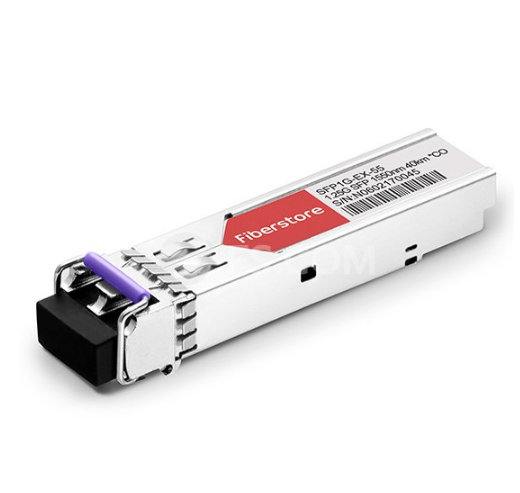
SFP 40 km transceiver is designed for highly reliable fiber optic network links up to 40 km. It is a cost effective transceiver designed to enable 1Gb for data center and core network applications. 1000BASE-EX SFP is the most popular SFP 40 km transceiver which runs on 1310nm wavelength lasers and achieves 40km link length. Except that, 1000BASE-BX BiDi SFP, 1000BASE-LH SFP and 1000BASE-LX SFP can also realize the transmission distance up to 40 km. The following will introduce these 1GbE SFP 40 km transceivers respectively.
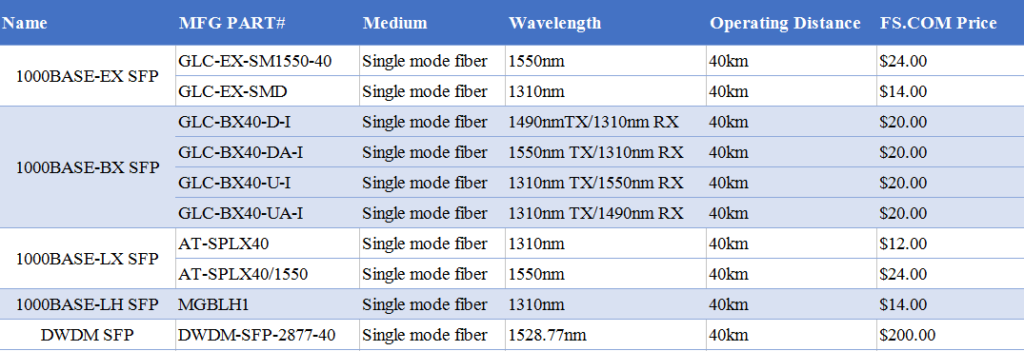
1000BASE-EX SFP transceiver module is designed to connect a Gigabit Ethernet port to a network and has dual LC/PC single mode connectors. It operates on standard single-mode fiber-optic link spans of up to 40 km in length. The SFP Ethernet module provides a dependable and cost-effective way to add, replace or upgrade the ports on switches, routers and other networking equipment. Cisco GLC-EX-SM1550-40 and Cisco GLC-EX-SMD are 1G single mode fiber SFP 40 km modules for 1000BASE-EX Gigabit Ethernet transmission. GLC-EX-SM1550-40 supports a 1550nm wavelength signaling, while GLC-EX-SMD supports a 1310nm wavelength signaling.
1000BASE-BX SFP is a kind of BiDi transceiver, which can be divided into 1000BASE-BX-D SFP and 1000BASE-BX-U SFP. These two SFP transceivers must be used in pairs to permit a bidirectional Gigabit Ethernet connection using a single strand of single mode fiber (SMF) cable. The 1000BASE-BX-D SFP operates at wavelengths of 1490nm TX/1310nm RX, and the 1000BASE-BX-U SFP operates at wavelengths of 1310nm TX/1490nm RX.
- 1000BASE-BX-D BiDi SFP 40 km
Cisco GLC-BX40-D-I and GLC-BX40-DA-I are pluggable fiber optical transceivers for Gigabit Ethernet 1000BASE-BX and Fiber Channel communications. They support link length of up to 40 km point to point on single mode fiber at 1Gbps bidirectional and use an LC connector. The GLC-BX40-D-I transceiver transmits a 1490nm channel and receives a 1310nm signal, whereas GLC-BX40-DA-I transmits at a 1550nm wavelength and receives a 1310nm signal.
- 1000BASE-BX-U BiDi SFP 40 km
Similar to 1000BASE-BX-D 40 km SFP , Cisco GLC-BX40-U-I and GLC-BX40-UA-I also support link length of up to 40 km point to point on single mode fiber at 1Gbps bidirectional and use an LC connector. The main difference is the wavelength: GLC-BX40-U-I transmits a 1310nm channel and receives a 1550nm signal, whereas GLC-BX40-UA-I transmits at a 1310nm wavelength and receives a 1490nm signal. A GLC-BX40-D-I or GLC-BX40-DA-I device connects to a GLC-BX40-U-I or GLC-BX40-UA-I device with a single strand of standard SMF with an operating transmission range up to 40 km.
1000BASE-LX is a standard specified in IEEE 802.3 Clause 38 which uses a long wavelength laser. The "LX†in 1000BASE-LX stands for long wavelength, indicating that this version of Gigabit Ethernet is intended for use with long-wavelength transmissions (1270 - 1355nm) over long cable runs of fiber optic cabling. Allied Telesis AT-SPLX40 and Allied Telesis AT-SPLX40/1550 are 1000BASE-LX SFP single-mode modules supports Gigabit Ethernet over single-mode cables at distances up to 40 km. AT-SPLX40 operates over a wavelength of 1310nm for 40 km, whereas AT-SPLX40/1550 operates over a wavelength of 1550nm.
Unlike 1000BASE-LX, 1000BASE-LH is just a term widely used by many vendors. Long Haul (LH) denotes longer distances, so 1000BASE-LH SFP modules operate at a distance up to 70 km over single mode fiber. Cisco Linksys MGBLH1 is a easy-to-install modules that provide a simple way to add fiber connectivity or to add an extra Gigabit Ethernet port to switches. The MGE transceiver can support distances up to 40 km over single-mode fiber at a 1310nm wavelength.
DWDM SFP
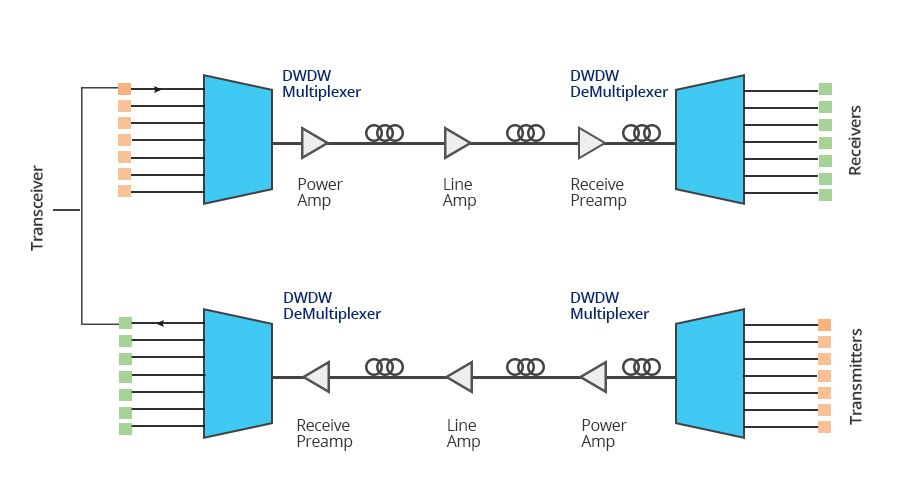
DWDM SFP transceivers are used as part of a DWDM optical network to provide high-capacity bandwidth across an optical fiber network, which is a high performance, cost effective module for serial optical data communication applications up to 4.25Gb/s. DWDM transceiver uses different wavelengths to multiplex several optical signal onto a single fiber, without requiring any power to operate. There are 32 fixed-wavelength DWDM SFPs that support the International Telecommunications Union (ITU) 100-GHz wavelength grid. The DWDM SFP can be also used in DWDM SONET/SDH (with or without FEC), but for longer transmission distance like 200 km links and Ethernet/Fibre Channel protocol traffic for 80 km links. Cisco C61 DWDM-SFP-2877-40 is a 1000BASE-DWDM SFP 40km transceiver, which is designed to support distance up to 40 km over single-mode fiber and operate at a 1528.77nm DWDM wavelength (Channel 61) as specified by the ITU-T.
SFP 40 km VS. DWDM SFP
- Transmission Medium
Generally, the standard SFP 40 km transceivers transmit through the single mode fiber, while DWDM SFP carries signals onto a single optical fiber to achieve maximum distances by using different wavelengths of laser light. So the DWDM SFP transceivers do not require any power to operate.
- Wavelength
The standard SFP 40 km transceivers support distances up to 40 km over single-mode fiber at a 1310nm/1550nm wavelength. (the BiDi SFP has 1490nm/1550nm TX & 1310nm RX or 1310nm TX & 1490nm/1550nm RX ). However, DWDM SFP operates at a nominal DWDM wavelength from 1528.38 to 1563.86nm onto a single-mode fiber. Among them, 40 km DWDM SFP operates at a 1528.77nm DWDM wavelength (Channel 61).
- Application
DWDM SFP is used in DWDM SONET/SDH, Gigabit Ethernet and Fibre Channel applications. These modules support operation at 100Ghz channel. The actual SFP transceiver offers a transparent optical data transmission of different protocols via single mode fiber. And for back-to-back connectivity, a 5-dB inline optical attenuator should be inserted between the fiber optic cable and the receiving port on the SFP at each end of the link.
- Price
DWDM provides ultimate scalability and reach for fiber networks. Boosted by Erbium Doped-Fiber Amplifiers (EDFAs) - a sort of performance enhancer for high-speed communications, DWDM systems can work over thousands of kilometers. Most commonly, DWDM SFP is much more expensive than the standard SFP. You can see the price more clearly in the following cable.
Conclusion
1000BASE SFP transceiver is the most commonly used component for Gigabit Ethernet application. With so many types available in the market, careful notice should be given to the range of differences, both in distance and price of multimode and single-mode fiber optics. Through SFP 40 km vs. DWDM SFP, if you are looking for SFP modules over long distance and with better scalability, DWDM SFP module is the ideal choice.
Related Article: SFP Transceiver: To Be or Not To Be?
Posted by: angelina at
06:45 AM
| Comments (1)
| Add Comment
Post contains 1208 words, total size 10 kb.
November 29, 2017
Gigabit Ethernet, as a part of the Ethernet family of computer networking and communication standards, has been in the market for more than 15 years. 1000BASE-T Gigabit Ethernet is the most successful networking technology in the history. Delivering Gigabit performance over up to 100 meters of twisted pair cabling (Cat5 UTP), it is ideal solution to upgrade network smoothly without change its original architecture and decrease the cost of upgrading for a wide range of enterprise and embedded networking applications. When investing in 1000BASE-T SFP modules to keep the highest working quality for business, everyone wants to find the best deals when they come to their network hardware, but also with the same compliance certification and quality. So where to buy reliable low cost 1000BASE-T SFP modules? This article will tell you answer.

1000BASE-T SFP copper transceiver is based on the SFP Multi Source Agreement. It is compatible with the Gigabit Ethernet and 1000BASE-T standards as specified in IEEE 802.3z and 802.3ab. This Gigabit RJ45 copper SFP transceiver module supports 1000Mbps over Cat5 cables with RJ45 connector interface, which operates on standard Cat5 unshielded twisted-pair copper cabling of link lengths up to 100 m (328 ft). So those 1G copper SFPs can plug into any standard SFP interface allowing for 1000BASE-T Gigabit transmission. When referring to the types of 1000BASE-T copper SFP modules, there are generally three types provided by Cisco: Cisco GLC-T, Cisco GLC-TE, Cisco SFP-GE-T.
GLC-T is the Cisco 1G copper SFP, which is compliant to IEEE 802.3, and operates over Cat5 copper wire for a distance of 100m. It provides 1Gbps data transfer and full-duplex Gigabit Ethernet connectivity to high-end workstations and between wiring closets over existing copper network infrastructure.

Similar to GLC-T SFP modules, GLC-TE provides a link length of 100m over Cat5 copper wires. The only difference between these two SFP modules lies in the operating temperature range. GLC-T SFP is commercial temperature range (COM) from 0 to 70°C (32 to 158°F), while GLC-TE is Extended temperature range (EXT) from -5 to 85°C (23 to 185°F).
SFP-GE-T is Cisco copper SFP transceiver that works with 1000BASE-T. This 1Gb SFP RJ45 module is with spring latch for high density applications. The most difference is that SFP-GE-T has the function of NEBS 3 ESD. (NEBS is short for Network Equipment Building System and is a set of standards for building networking equipment which can withstand a variety of environmental stresses.) Therefore, SFP-GE-T supports extended working temperature.
There are all sorts of resources to get the most out of technology budget, especially when it comes to find the Cisco 1000BASE-T SFP modules either for brand new, refurbished, or gently used. What are the best ways to find them for a much more inexpensive price?
- Online Retailers
Online retailers with warehouses not only provide consumer-side purchasing with modules and networking hardware, they can also be a valuable asset to all sorts of companies looking to spend less money on equipment. There are online retailers that give almost as high as 90% discounts and price reductions. You need to be careful when it comes to certain warehouses as they might have huge savings but the parts might be used or not of the highest quality.
- Certified Sellers
Certified sellers, or re-sellers, can offer brand new or refurbished modules with great prices. Besides, they have professionals who can help you with all of your technology questions and make sure that you get the best deal.
- Third-Party Companies
In fact, there are many third party vendors to manufacture compatible SFP modules, such as FS.COM, 10GTek, Finisar, Fluxlight etc. Many people are confused about whether I should use 3rd party SFP modules. Most "third party†transceivers are made and assembled in exactly the same plants assembling officially-branded transceivers. There is almost no big difference between an official Cisco transceiver and a third-party plug, aside from the branding and about two hundred to a few thousand bucks. And now, using 3rd party SFP modules seems to more and more popular, as many 3rd party SFP module vendors are providing high quality and reliable 3rd party SFP modules with low prices. Besides, third-party SFPs can be as reliable as official OEM products.
| Copper SFP Models | Description | Operating Temperature Range | FS.COM Price | Fluxlight Price |
| Cisco GLC-T | 1000BASE-T SFP Copper RJ-45 100m Transceiver | COM | $ 21.00 | $ 44.00 |
| Cisco GLC-TE | 1000BASE-T SFP Copper RJ-45 100m Transceiver | EXT | $ 21.00 | $49.00 |
| Cisco SFP-GE-T | 1000BASE-T SFP Copper RJ-45 100m Transceiver | NEBS 3 ESD EXT | $ 21.00 | $44.00 |
The 1000BASE-T SFP copper transceiver offers a flexible and simple method to be installed into SFP MSA compliant ports at any time with no interruption of the host equipment operation. It enables for seamless integration of fiber with copper LAN connections wherever SFP interface slots can be found. Such system is economical, it saves time, offers flexibility and eliminates the necessity for replacing entire devices once the customers have to change or upgrade fiber connections and you will benefit so much from it.
Related Article: GLC-T vs GLC-TE vs SFP-GE-T: Which One to Choose?
Posted by: angelina at
07:18 AM
| Comments (1)
| Add Comment
Post contains 871 words, total size 8 kb.
November 22, 2017
With the spread of cloud computing and mobile broadband service, the volume of communications traffic has rapidly increased. In order to enable high-capacity optical networks, using a single optical fiber for optical signals of several different wavelengths in DWDM system is widely used. For this reason, tunable transceiver that enables ROADM functionality in next-generation networks is becoming more and more popular. In today’s market, there are mainly two kinds of tunable DWDM transceivers: tunable XFP and tunable SFP+. This article will take you to explore the DWDM C-band tunable XFP transceiver with 40 / 80 km transmission distance options.

Tunable XFP transceiver is an integrated fiber optic transceiver that provides a high-speed serial link at signaling rates from 9.95 Gbps to 11.35 Gbps. It complies with the ITU-T G.698.1 S-D100S1-2D standard with 50GHz channel spacing for SONET/SDH, IEEE DWDM 10GBASE-ZR for 40 or 80 km reach (Ethernet), and DWDM 10G FC (Fibre Channel) for 40 or 80 km reach applications. Tunable XFP can be tuned from channel C17 (1563.86nm) to C61 (1528.38nm). The maximum distance of this transceiver on a single mode fiber is up to 80 km. As mentioned above, tunable XFP optical transceiver is a full-duplex serial electric, serial optical device with both transmit and receive functions contained in a single module. On the transmit side, the 10 Gbps serial data stream is recovered, retimed, and passed to a modulator driver. The modulator driver biases and modulates a C-band-tunable integrated laser Mach-Zehnder (ILMZ), enabling data transmission over singlemode fiber through an industry-standard LC connector. On the receive side, the 10 Gbps optical data stream is recovered from an APD/transimpedance amplifier, retimed, and passed to an output driver. This module features a hot-pluggable XFI-compliant electrical interface. Here is a simple picture showing its working process.

- 50 GHz ITU channel spacing with intergrated wavelength locker
- Available in all C-Band Wavelengths on the DWDM ITU grid
- Available distances 40 or 80 km
- Supports 9.95Gb/s to 11.35Gb/s
- Built-in Digital Diagnostic Functions
- Tempereature Range: -5°C to 70°C
There are two transmission distance options for tunable XFP transceiver: 40 km or 80 km. Tunable XFP DWDM 80 km transceiver is designed for long distance optical communications up to 80 km with signaling rates up to 10Gbps. Obviously, the main difference is transmission distance. On account that 10G tunable DWDM XFP optical transceiver provides digital diagnostic functions via a 2-wire serial interface, which allows real-time access to the following operating parameters: transmitted optical power, received optical power, transceiver temperature, laser bias current and transceiver supply voltage. Therefore, the differences between 40 km tunable XFP and 80 km tunable XFP mainly lie on theses parameters. One thing to note is that 40 km tunable XFP optics is designed with high performance PIN receiver, while the 80 km tunable XFP transceiver is APD receiver. The APD (avalanche photodiode) receiver employed in these extended-reach optical transceivers has an enhanced sensitivity to allow for these extended distance fiber runs. However, it is to be noted that the input power is typically between -7 and -24 dBm. Therefore, the receiver sensitivity between these two distance has a big difference. Generally, the max receive dBm of 40 km tunable XFP transceiver is -15, while the 80 km tunable XFP transceiver is -24. And for power budget, 40 km tunable XFP is 14dB while a distance up to 80 km is up to 22dB power budget. The following table lists the main differences.

In general, the channel switching of tunable switches can enable the service operators to turn up circuits faster and reduce their sparing costs dramatically in today’s DWDM systems. On the other hand, tunable transceiver is usually two or four times more expensive than the regular static DWDM optical module, because a special tunable laser is applied in it. Tunable XFP transceiver provides a full C-band window covering 1528nm to 1566nm for DWDM optical networks, which meets the need of rapid increase in the volume of communications traffic from telecom carrier and operator. The tunable DWDM XFP module can replace the fixed DWDM channel XFP transceivers that are currently used, while reduce the large stock since all wavelengths can now be covered with one transceiver module.
| Model | Frequency | Wavelength | Fiber Type | Connector |
| ONS-XC-10G-C | 50 GHz | 1563.86~1528.3 | SMF | LC |
| XFP-10G-CBAND-T50-ZR | 50 GHz | 1563.86~1528.3 | SMF | LC |
| NTK583AAE6 | 50 GHz | 1563.86~1528.3 | SMF | LC |
| TDXFP-10GHXXX-80 | 50 GHz | 1563.86~1528.3 | SMF | LC |
| TDXFP-10GHXXX-40 | 50 GHz | 1563.86~1528.3 | SMF | LC |
Posted by: angelina at
02:30 AM
| No Comments
| Add Comment
Post contains 765 words, total size 8 kb.
November 14, 2017
With the growth of virtualization, cloud-based services and applications like VoIP, video streaming and IP surveillance, SMB networks need to extend beyond simple reliability to higher speed and performance. As a leading provider of networking equipment for SMBs, Netgear had launched a variety of cost-effective 10GBASE-T switches including Netgear ProSAFE XS708Ev2, XS716E, XS708T, XS712T, XS716T, XS728T, XS748T and XSM7224. When looking for a lower cost and high capacity 10GBASE-T switch in SMB home/office lab environments, the Netgear ProSAFE XS712T is one of the best options. It comes in at around $1,100 at Amazon which is more budget friendly than the larger data center switches. This article will review the Netgear ProSAFE XS712T (XS712T-100NES) 10GBASE-T switch.
Netgear ProSAFE XS712T is a powerful smart managed switch that comes with 10 dedicated 10GBASE-T RJ-45 copper ports supporting 100M/1G/10G speeds and 2 combo copper/SFP+ fiber 10G ports. The 2 combo SFP+ ports can be used as 10GASE-T ports or as SFP+ 10Gb Ethernet ports. This is an awesome feature as it allows an inexpensive SPF+ link via DAC to a 24 or 48 port 1Gb Ethernet switch for non-10Gb networking needs. All ports can automatically negotiate to the highest speed, which makes the switch ideal for environments that have a mix of Ethernet, Fast Ethernet, Gigabit Ethernet, or 10-Gigabit Ethernet devices. Cat 5e/Cat 6/Cat 6a/Cat 7 can be used to make 10G connections. Cat 6a/Cat 7 cables are recommended if the cable distance is greater than 45 meters. Besides, the smart switch can be freestanding or rack mounted in a wiring closet or equipment room. This 10G smart managed switch is purposely designed as a cost-effective way to provide 10G connections to 10G-capable servers and NAS (Network Attached Storage) systems. It also can be used at the center of a small business network or as an aggregation/access switch in a larger organization.
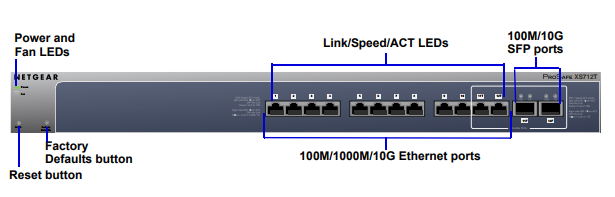
Figure 1: Netgear ProSAFE XS712T (Source: www.netgear.com )
In order to meet the current and future needs on virtualization, converged network and mobility, the XS712T provides comprehensive L2+/Layer 3 Lite features, such as VLAN, QoS, IGMP and MLD snooping, Static Routing, Link Aggregation, ACL binding. Besides, it has an easy-to-use Web-based management GUI which makes setup and management simple. Some of main features include:
The RJ-45 copper ports of XS712T comply with IEEE 10GBASE-T standards. They support low-latency, line-rate 10G copper "Base-T†technology with backward compatibility to Fast Ethernet and Gigabit Ethernet. So it allows for a cost effective and simpler upgrade path to 10-Gigabit Ethernet. The existing Cat5/Cat5e is supported for Gigabit speeds up to 100 meters, Cat6 for 10-Gigabit speeds up to 45 meters and Cat6a/Cat7 for 10GBASE-T connection up to 100 meter.
The powerful L2+/Layer 3 Lite features make XS712T the most cost-effective core switches for SMB and virtualization environment. This switch is also a future-proofing choice with 10G bandwidth, advanced traffic management and comprehensive IPv6 support.
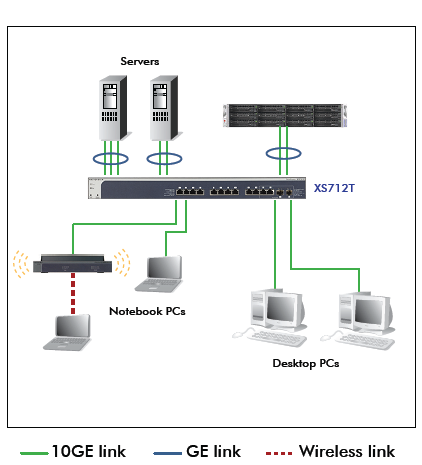
Figure 2: Netgear ProSAFE XS712T in SMB Network (Source: www.netgear.com )
The XS712T used as a aggregation switch has many useful purposes. It can help to resolve the congestion issue between network edge and core, which is caused by the broader adoption of Gigabit-to-the-desktop. Unlike multiple Gigabit Ethernet links, it provides greater scalability resulting in a simplified and highly efficient network infrastructure. What’s more, it can reduce cabling complexity because it can use existing cabling efficiently.
As mentioned above, The Netgear ProSAFE XS712T smart switch provides 12 twisted-pair ports that support nonstop 100M/1000M/10G networks. The switch also has two built-in SFP+ GBIC combo slots that support 1000M and 10G optical modules. Using these Gigabit slots, 100M/1000M/10G copper and 1000M/10G fiber connectivity can create high-speed connections to a server or network backbone. So 1000BASE-T SFP copper transceiver, 1000BASE SFP and 10G SFP+ transceivers are suitable for this switch. The following table lists the compatible transceivers and optic cables from FS.COM.
| MFG PART# | Description |
| AGM734 | NETGEAR AGM734 Compatible 1000BASE-T SFP Copper 100m Transceiver, RJ-45 Interface |
| AGM731F | NETGEAR Compatible 1000BASE-SX SFP 850nm 550m DOM Transceiver, LC Interface |
| AGM732F | NETGEAR Compatible 1000BASE-LX SFP 1310nm 10km DOM Transceiver, LC Interface |
| AXM761 | NETGEAR Compatible 10GBASE-SR SFP+ 850nm 300m DOM Transceiver, LC Interface |
| AXM762 | NETGEAR Compatible 10GBASE-LR SFP+ 1310nm 10km DOM Transceiver, LC Interface |
| AXM763 | NETGEAR Compatible 10GBASE-LRM SFP+ 1310nm 220m DOM Transceiver, LC Interface |
| AXM764 | NETGEAR Compatible 10GBASE-LR Lite SFP+ 1310nm 2km DOM Transceiver, LC Interface |
| AXC761 | 1m NETGEAR Compatible 10G SFP+ Passive DAC |
| AXC763 | 3m NETGEAR Compatible 10G SFP+ Passive DAC |
The Netgear XS712T (XS712T-100NES) provides a solid cost-effective solution especially for those with SMB home/ office lab environments. If you are seeking for afforable 10GBASE-T switch for your home lab, the XS712T can be taken into consideration. What’s more, the compatible fiber transceivers and cables can be found in many third party vendors with reasonable prices, such as cablestogo, fluxlight, smartoptics, FS.COM, and etc. You have a lot of choices to save money.
Posted by: angelina at
08:40 AM
| Comments (1)
| Add Comment
Post contains 851 words, total size 8 kb.
October 31, 2017
For data center and enterprise deployments, pre-terminated copper trunk cable is a wonderful choice to achieve simple and quick installation. It can fit most patch panel port densities and improve better airflow and cable management. With the right upfront panning and coordination, these copper trunk cables can offer major benefits over terminating twisted-pair cables in the field. This article will take you to explore the pre-terminated copper trunk cable.

Pre-terminated copper trunk cable is a kind of cable which has gone through the same procedures with other cables. But their connectors have already been terminated, properly polished, and the entire cable assembly tested on either both or one end in factory. Copper trunk cables are typically comprised of bundles of 6, 8, or 12. Since they are bundled together, there is no need to worry about cable mess. Pre-terminated copper trunk cables provide a quick "plug-and-play†solution for links between switches, servers, patch panels and zone distribution areas in the data center.
- Increase speed of deployment
Compared to field terminations, pre-terminated cabling can reduce installation time by up to 75 percent.
- Improve cable management
Pre-terminated solutions are ideal for data centers, which are designed with consistent distances between cabinets and rows.
- Remove the need for transmission performance testing
For pre-terminated copper trunk cable, the transmission testing is performed by manufacturer before shipment.
- Avoid time-wasting rework
Pre-terminated copper trunk cables are terminated in factory, and many of them are provided in a cassette format. This format allows installers to "plug and play†multiple connections with one cassette, which reduce installation time obviously.

When selecting copper trunk cables, to choose a right termination type is a very important step, which is based on the layout of the data center or telecommunications room. it's worth noting that the accessibility of the active equipment (including servers, switches, etc.) and the proper patching solution should be considered during the process of selection. Generally, there are four common termination types: jack-to-jack, jack-to-plug, plug-to-plug and jack-to-open. Different types have different requirements for installation. The following will introduce these four termination types respectively:
Jack to Jack: This termination type is typically used in cabinet-to-cabinet permanent link trunk. In general, it is installed into empty patch panels on both ends in common interconnect and cross connect architectures. The use of patch cords is used to complete the connectivity between the active equipment and the physical layer.
Jack to Plug: Typically used for in-cabinet or cabinet-to-cabinet equipment cord harnesses, the jack-to-plug type is installed into the patch panels on one end and switch ports on the other end for switch port replication applications, eliminating one cross-connect point by having the cable plug directly into the active equipment.
Plug to plug: Typically used to make a direct connection between active equipment, e.g. server to switch, eliminating cross-connect capabilities. It can also be used in an open-space work area as a bundled patch cord group.
Jack to Open: This type is similar to jack-to-jack configuration, but one end should be cut to length and field-terminated to a target termination place, such as 110-style panel, patch panel or wall plate. Field testing of the drops is necessary after the cables have been terminated in this case.
Copper trunk cables using Cat5, Cat5e, Cat6 and Cat7 cables are all available in the market.
The most commonly used copper cables usually have 6 or 12 cables in one bound. Higher or lower cable counts are also available.
Breakout length refers to the dimension from the end of the braided sleeve to connectors at the end of the cables. This dimension is part of the overall length, not in addition to the length measurement. The primary consideration for breakout length is to have flexibility to route the cables as needed.
For pre-terminated copper trunk cable assemblies, length is a very important parameter to be ordered which help users to achieve the best performance.

You must consider the fire ratings of materials to minimize danger in the event of a fire. Most data centers are a riser environment, where airflow is not a consideration. The jacket of cables is an important point when selecting pre-teminated copper trunk cables. The purpose of the jacket is to protect the wiring from physical damage, moisture, ozone and ultraviolet rays. PVC is made of polyvinyl chloride that gives off heavy black smoke, hydrochloric acid and other toxic gases when it burns. While LSZH has a flame-resistant jacket that doesn’t emit toxic fumes even if it burns. Both cables are excellent in performance, so it depends on the situation whether you choose LSZH or PVC.
FS.COM provides a lot of Cat5e/Cat6/Cat7 pre-terminated trunk cable with plug-to-plug or jack-to-jack termination type. And FS.COM copper trunks include a braided mesh sleeve whose properties match that of the cable jacket. This ensures that the binding material does not degrade the suitability of the product in a plenum environment. The following table lists the main solutions.
| FS P/N | Cable Type | Cable Color | Termination Type | Cable Rating | Cable Count |
| CAT5E-U12PPBE-3M | Cat5e Unshielded | Blue | Plug to Plug | LSZH | 12 |
| CAT6-U06JJBE-10M | Cat6 Unshielded | Blue | Jack to Jack | LSZH | 6 |
| CAT6-U6PPBE-3M | Cat6 Unshielded | Blue | Plug to Plug | PVC CMR | 6 |
| CAT6-U06HQJJ-10M | Cat6 Unshielded | Blue | Jack to Jack | PVC CMR | 6 |
| CAT6A-S6PPOW-5M | Cat6a Shielded | Off-White | Plug to Plug | PVC CMR | 6 |
Pre-terminated copper trunk cable assemblies are an ideal solution for data center infrastructures and backbone applications where cable distances are reasonably predictable and can be easily determined. They play an important role in reducing installation time and cost, helping you deploy a reliable, easy-to-use copper trunking system.
Posted by: angelina at
07:26 AM
| Comments (1)
| Add Comment
Post contains 977 words, total size 10 kb.
October 12, 2017
The requirements of virtualization and cloud trends are changing enterprise business environments, high port density, high throughput and very low latency are bedrock requirements in the data center. The HP 5820 switch series are built to meet these requirements, and help enterprises to reduce operating costs and build agile and resilient enterprises. As a member in the family of HP 5820 switch series, the HP 5820AF-24XG switch is a managed L3 switch supporting Gigabit Ethernet and 10 Gigabit Ethernet SFP+ optics and cables. It can serve as a leaf or access top-of-rack 10 Gigabit Ethernet switch in data centers. This article will provide the optical solutions such as fiber optic transceivers and direct attach cables that are supported by HP 5820AF-24XG switch.

In the family of HP 5820 switch series, HP 5820AF-24XG switch (JG219B ) thus obtains several features of the series. It provides a versatile, high-performance and 1/10GbE top-of-rack data center switch architecture with deployment flexibility. The switch can be deployed for data center top-of-rack server access; or as high-performance Layer 3, 10GbE aggregation switches in campus and data center networks. JG219B offers Gigabit and 10 Gigabit connectivity. It includes 24 fixed 1000/10000 SFP+ ports and 4 RJ-45 autosensing 10/100/1000 ports. The total switching capacity of this switch can reach up to 484 Gbps supporting as much as 363mpps throughput.

As stated above, the HP 5820AF 24XG switch is available with 1 GbE and 10 GbE data links. The SFP transceivers, SFP+ transceivers, 10G SFP+ to SFP+ direct attach copper cables and 40G QSFP+ to 4x10G SFP+ direct attach copper breakout cables for HP 5820AF 24XG switch are shown in the following tables.
| MFG PART# | Description | Cable Type | Interface |
| JD061A | HP Compatible 1000BASE-LH SFP 1310nm 40km DOM Transceiver, $ 14.00 | SMF | LC Duplex |
| JD062A | HP Compatible 1000BASE-LH SFP 1550nm 40km DOM Transceiver, $ 24.00 | SMF | LC Duplex |
| JD063B | HP Compatible 1000BASE-LH SFP 1550nm 70km DOM Transceiver, $ 24.00 | SMF | LC Duplex |
| JD089B | HP Compatible 1000BASE-T SFP Copper RJ45 100m Transceiver, $ 16.00 | Cat 5 | RJ45 |
| JD118B | HP Compatible 1000BASE-SX SFP 850nm 550m DOM Transceiver, $ 10.00 | MMF | LC Duplex |
| JD119B | HP Compatible 1000BASE-LX SFP 1310nm 10km (SMF Distance) DOM Transceiver, $ 12.00 | SMF/MMF | LC Duplex |
| MFG PART# | Description | Cable Type | Interface |
| JD092B | HP Compatible 10GBASE-SR SFP+ 850nm 300m DOM Transceiver, $ 16.00 | MMF | LC Duplex |
| JD093B | HP Compatible 10GBASE-LRM SFP+ 1310nm 220m DOM Transceiver, $ 34.00 | MMF | LC Duplex |
| JD094B | HP Compatible 10GBASE-LR SFP+ 1310nm 10km DOM Transceiver, $ 34.00 | SMF | LC Duplex |
| JG234A | HP Compatible 10GBASE-ER SFP+ 1550nm 40km DOM Transceiver, $ 149.00 | SMF | LC Duplex |
| MFG PART# | Description |
| JD095C | 0.65m HP JD095C Compatible 10G SFP+ Passive DAC, $ 22.00 |
| JD096C | 1.2m HP Compatible 10G SFP+ Passive DAC,$ 23.00 |
| JD097C | 3m HP Compatible 10G SFP+ Passive DAC, $ 29.00 |
| JG081C | 5m HP Compatible 10G SFP+ Passive DAC, $ 56.00 |
| MFG PART# | Description |
| JG329A | 1m HP Compatible QSFP+ to 4SFP+ Passive Breakout DAC, $ 78.00 |
| JG330A | 3m HP Compatible QSFP+ to 4SFP+ Passive Breakout DAC, $ 91.00 |
| JG331A | 5m HP Compatible QSFP+ to 4SFP+ Passive Breakout DAC, $ 120.00 |
HP 5820AF 24XG switch (JG219B) provides a simplified network architecture designed for scalability and reliability. It is a good option for 1 GbE and 10 GbE networks over buildings, campus and data centers.
Posted by: angelina at
07:07 AM
| Comments (1)
| Add Comment
Post contains 593 words, total size 8 kb.
September 14, 2017
PoE is a technology which enables electrical power to pass over Ethernet cable at distances up to 100m. It is developed to reduce the cost of network planning, cabling and installation. PoE is primarily used for low-powered terminal devices, typically VoIP phones, IP cameras and wireless access points, but it can also provide a redundant power supply for switches to increase the network’s reliability. Until recently, the PoE switches are commonly found in industrial Ethernet network deployments.

The IEEE is responsible for creating PoE standards. Currently, there are two PoE standards available: 802.3af and 802.3at. The 802.3af standard supports 15.44 watts of power. But even though 802.3af powered sourcing equipment (PSE) are able to transmit 15.44 watts of power, powered devices (PDs) can only reliably receive 12.95 watts of power due to power dissipation. In 2009, IEEE introduced the higher powered 802.3at standard, which is known as PoE+. The standard supports 30 watts of power, but similar to the 802.3af standard, power dissipation causes powered devices to receive slightly lower amounts of power, specifically 25.5 watts of power. The IEEE Committee is now developing a new standard (IEEE802.3bt) which will power up 70+ Watt loads.
A PoE system comprises of four pieces of equipment: power sourcing equipment (PSE), a device which supplies power to the rest of the system; powered device (PD), a device which receives power from the PSE device; Ethernet cable, the power and data transmission medium of a PoE system; and power supply. The figure below shows the basic principle of a PoE system.

As PoE changes to meet growing technology and application requirements, it is being classified by classes. PoE classes ensure efficient power distribution by specifying the amount of power that a PD will require. PDs that require less power than the lowest PoE standard receive a low-ranking power classification and allows the PSE to allocate the surplus amount of power to other connected devices. PoE systems provide high reliability, convenience and low cost. The available 25 watts per port is sufficient to power many common applications. Since PoE systems are classified as low-power systems, they need not be installed nor maintained by licensed personnel.
A PoE switch is a dedicated device that contains multiple Ethernet ports to provide power and network communications to IP cameras. At the same time, it is a kind of PSEs to allocate power to the desired amount of connected powered devices. For example, S1400-24T4F gigabit switch is an 802.3af PoE compliant PSE that boasts a total PoE power budget of 400 watts. There is 25% redundant power peak, which can fully allocate IEEE802.3af PD devices, and half allocate the IEEE802.3at PD devices, such as IP cameras, VoIP phones or wireless access points. It can automatically adjust energy consumption according to the ports’ actual flow, dynamically sense idle periods between traffic bursts and quickly switch the interfaces into a low power idle mode, in result to save 30% power dissipation. By the way, when you utilize PoE managed switches, installation of controllers and access points is greatly simplified. You won’t need to provide separate power cables or install plugs near Wi-Fi locations. You’d simply run your Cat5e or Cat6 cable from your hotspot to your switch. All in all, PoE switch is the best option for SMB or entry-level enterprise solution which demands industrial surveillance, IP phone, IP camera or wireless applications.

PoE switch provides the availability of critical business applications, protects the sensitive information, and optimizes the network bandwidth to deliver information and applications more effectively. It is the best option for SMB network. Before ordering your PoE switch, you should consider what your goals are for the network. In many cases, future-proofing with a better PoE switch may actually be a much better investment.
Posted by: angelina at
10:13 AM
| Comments (1)
| Add Comment
Post contains 652 words, total size 5 kb.
July 27, 2017
As data traffic increases, the requirements for high-bandwidth equipment also continue to rise. Many IT departments are looking towards devices like the 100G QSFP28 transceiver to achieve rapid data transmission. This small, high-density and high-speed product often comes as a standard part of 100G equipment. Therefore, these 100G optical transceivers have become the vital components in data centers. In this article, we will talk about the basic types of 100G QSFP28 optical transceivers, including SR4, PSM4, CWDM4 and LR4 versions.
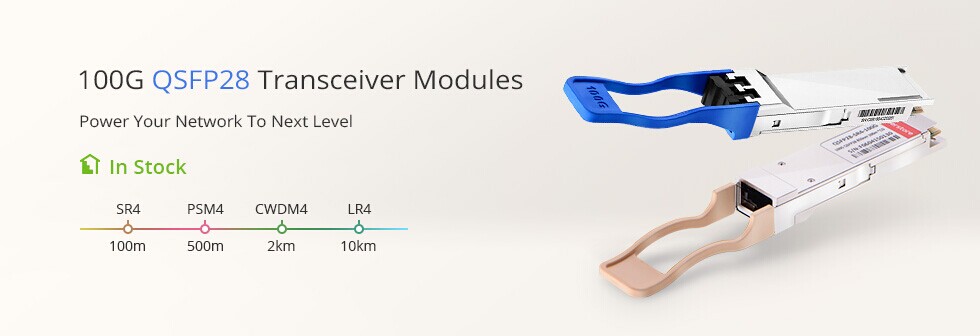
QSFP28 optical transceiver, designed in 100 Gb/s Ethernet network, which can provide high performance at low power. Firstly, these QSFP28 transceivers are fully compliant with all the latest Fibre Channel and Ethernet standards. And they have very high volumes, because it supports both 100G and 25G links. They allow maximum network capacity and help you quickly migrate to 100G transmission. Also, QSFP28 module is the smallest module available, and has the lowest power consumption among those that are capable of handling 100G traffic. So overall, these compact, high-density and high-speed modules can help to reduce the footprint of servers and lower power consumption while enabling more rapid data transmission.
FS has a wide range of 100G modules so that users can extend their choices when selecting a QSFP28 transceiver. These transceiver types include QSFP-100G-SR4-S, QSFP-100G-PSM4-S, QSFP-100G-CWDM4-S and QSFP-100G-LR4-S. And you can choose different brands of these types, covering Cisco, Juniper, Arista, Brocade, Extreme, Dell, Huawei, Ciena and Generic Compatible.
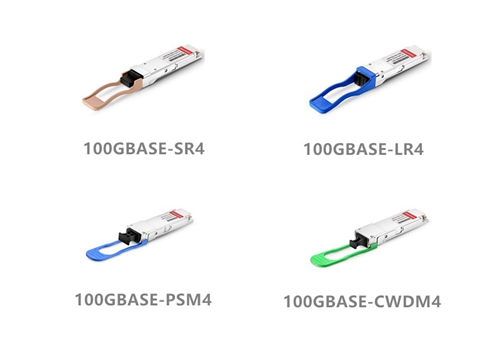
QSFP-100G-SR4-S: The SR4 version supports 100G Ethernet up to 70m on OM3 MMF and up to 100m on OM4 MMF. This 100G QSFP28 SR4 full-duplex optical module offers 4 independent transmit and receive channels, while each offers 25Gb/s operation for an aggregate data rate of 100Gb/s on 100 meters of OM4 multi-mode fiber. An optical fiber ribbon cable with an MTP/MPO connector can be plugged into the QSFP28 module, while electrical connection is achieved through an MSA-compliant 38-pin edge type connector.
QSFP-100G-PSM4-S:The PSM4 version is targeted to service the need of a parallel single mode infrastructure, as most customers currently pursue to the low cost solutions at 500m reach. The PSM4 offers 100G link length up to 500m. This 100G QSFP28 PSM4 defines a four lane 100 Gb/s optical interface to SMF media. Four identical and independent lanes are used for each signal direction. Moreover, the 100G PSM4 transceiver module provides a bi-directional electrical interface with the Host and a bi-directional optical interface with the fiber media. It performs transmit and receive functions that convey data between the Host and the media. All in all, the 100G PSM4 module define requirements for a point-to-point 100 Gb/s link over eight single-mode fibers up to at least 500 m.
QSFP-100G-LR4-S: The LR4 version supports connections up to 10km over single-mode fiber at a wavelength of 1310nm with duplex LC connectors. QSFP-100G-LR4-S supports 100GBase Ethernet rate up to 1km, and the signal is carried over four wavelengths managed within the device. The module converts 4 input channels of 25 Gbps electrical data to 4 channels of LAN WDM optical signals and then multiplexes them into a single channel for 100 Gbps optical transmission. Correspondingly, on the receiver side, the module de-multiplexes a 100 Gbps optical input into 4 channels of LAN WDM optical signals and then converts them to 4 output channels of electrical data. Besides, 100G QSFP28E-LR4 incorporates the electro-absorption modulated lasers (EML), EML have slightly different optical properties making them suitable for multi-rate traffic types.
QSFP-100G-CWDM4-S: The QSFP-100G-CWDM4-S optical transceiver is a full duplex optic module that provides a high-speed link at aggregated data rate of 103.13 Gbps over 2 km of single-mode fiber with duplex LC connectors. CWDM4 modules have the following common features: four optical transmitters, four optical receivers with signal detect,wavelength division multiplexer and de-multiplexer and a duplex optical connector for single-mode fiber. The transceiver four lasers with center wavelengths of 1271 nm, 1291 nm, 1311 nm and 1331 nm. The optical signals are then multiplexed into a single-mode fiber through an industry standard LC connector. On the receive side, four lanes of optical data streams are optically de-multiplexed by an integrated optical demultiplexer and transformed to an electrical CAUI-4 compliant output driver. This module features a hot-pluggable electrical interface, low power consumption and 2-wire I2C management interface.
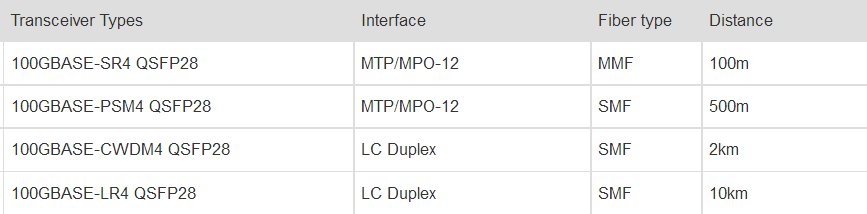
All versions are fully compliant with the MSA standards and digital diagnostics functions are available via an MDIO interface, as specified by the QSFP28 MSA. These units operate off a single 3.3V power supply, and feature maximum power consumption of 3.5W (CWDM4, SR4, PSM4), or 4.5W/4.0W (LR4).
This next-generation QSFP28 provides increased port density and high performance for future data center and networking use. Most importantly, they can save you total expenditure in your date centers. For cost-sensitive data center customers, you can take your network to the next level with FS 100G QSFP28 optical transceivers, which offer easy compatibility with your existing switches and routers.
Posted by: angelina at
11:09 AM
| Comments (1)
| Add Comment
Post contains 836 words, total size 7 kb.
July 24, 2017
Today's data centers and telecommunication environments heavily depend on the foundation of the optical network. So what makes your optical network different to others? The design and performance of the pre-terminated optical cabling systems will contribute more to your data environments. It’s achievable with FS ultra high density solutions that take your data environments beyond the next level. This article will mainly talk about the ultra high density MPO/MTP cassette in data centers.
MPO/MTP cassette is a module, which is used for interconnect or cross connect if the distance between two devices is too long. As a pre-terminated fiber product, MPO/MTP cassette is loaded with 12 or 24 fibers and have LC or SC adapters on the front side and MPO/MTP at the rear. The cassettes come in a variety of connector styles and modes, including multimode, single-mode, SC, LC, etc. It is designed to reduce the installation time and effort associated with connecting a fiber optic network, as well as, improving overall network reliability through factory tested terminations. The cassette itself is comprised of four parts:
(1) MPO/MTP adapters in back
(2) MPO/MTP connectors to SC/LC fan out assembly inside the cassette
(3) SC, ST, MTRJ and LC adapters in the front
(4) The cassette module body can be configured to multiple manufacturers.

MPO/MTP Cassette Drawing
- High density pre-terminated fiber optic system
- Aluminum alloy shell protect the inner fibers effectively
- Improved reconfiguration during moves, adds and changes
- MPO/MTP cassettes provide faster and easier conversion between MPO/MTP and LC interfaces, which becomes the prefect choice for ultra high density MPO/MTP cabling system.
- MTP/MPO cassettes loaded into high-density fiber enclosures ensure data center space optimization, providing high fiber density and serviceability for high-performance data centers.
- MTP/MPO cassettes make the high-density fiber cabling system the most serviceable and manageable on the present market. They are used for optimum serviceability and manageability, providing the scalability to increase density as business demand evolves.
FHX-1MTP3LCQSMFA is a ultra high density MPO/MTP cassette, which is fitted with 12 fibers and has array adapters on the front side and MTP at the rear. It could be loaded in FHX series enclosures by plugging in the MTP connector through the back. From the front you can connect 3 LC UPC patch cords and patch your data to your switch, converter, or server. This cassette addresses today’s requirements for increasingly higher density levels. After that, FHX series MTP/MPO cassettes are used for high density pre-terminated optical cabling solutions offering industry-leading connector density. Each individual cassette of the whole series comes with test results that include insertion loss and return loss for both the MTP connector as well as the fan out to the SC or LC connections. What’s more, the cassettes come pre-loaded and pre-assembled to your specifications.
The following are main highights of FHX series MTP/MPO cassettes:
- Ultra high density pre-terminated fiber optic system
- Flat design maximizes space savings & improves flexibility
- Specially designed for quick loading and removal of modules
- US Conec MTP Adapter
Key up to key down type, which is fully compliant with IEC Standard 61754-7 and TIA 604-5.
- Ultra- thin Design
Ultra light, ultra- thin design provides great space savings in the network.
- The Flame Retardant Grade - ABS UL94 V0
Made by the halogen free, flame retardant material, which meets the ABS UL94 V0 Grade.
- The Special Buckle
Ready to install, easy operation, maximum operability and minimum downtime.
The system carries a high-density enclosure to optimize data center space, with innovative cable management, making the ultra high density fiber cabling system the most serviceable and manageable on the market today.


Method A Guidelines for Duplex Signals 10G Ethernet and Fiber Channel Applications
FS.COM provides a comprehensive solution of ultra HD MTP/MPO cassettes and the associated ultra high-density fiber enclosures. These MTP/MPO cassettes provide secure transition between MTP/MPO and LC or SC discrete connectors, used to interconnect MTP/MPO backbones with LC or SC patching. They allow for rapid deployment of high density data center infrastructure as well as improved troubleshooting and reconfiguration during moves, adds, and changes. Moreover, they enable users to take the fibers brought by a trunk cable and distribute them to duplex cable. I believe that ultra high density MPO/MTP cassettes can be your best solution to save space, time, and energy.
Posted by: angelina at
06:58 AM
| Comments (1)
| Add Comment
Post contains 797 words, total size 8 kb.
July 07, 2017
With the introduction of IEEE 802.3an 10GBASE-T, it was determined that a new category of twisted-pair cabling was required to guarantee performance of the 10G network. Most of the time, Cat5e is suitable for 1G network. But now, many streaming media applications can be seen everywhere, the demands for faster data rates will be increased. These new applications are really pushing the limits of Cat5e cabling. Therefore, Cat6 will be a successful choice to deploy a new cabling system. So what is Cat6? What is the difference between Cat5e and Cat6? And so on. This article will provide simple answers to these questions.
A: Cat6 is a standardized twisted pair cable for Ethernet and other network physical layers that is backward compatible with the Cat5/5e and Cat3 cable standards. Cat6 cables have a tighter twist in the cables allowing for two-way communication, which eliminate some or all cross talk with other cables. The cable standard provides performance of up to 250 MHz and is suitable for 10GBASEâ€T / 100BASEâ€TX and 1000BASEâ€T / 1000BASEâ€TX Gigabit Ethernet. In addition, the Cat6 cable is terminated in either the T568A scheme or the T568B scheme. So far, the T568B Scheme is the most widely used method of terminating patch cables.
A: First, the cable construction. It is a observable difference. The diameter of Cat6 cables are in the range of 0.21 to 0.25 inch (5.3 - 5.8 mm), while Cat5e cables are in the range of 0.19 to 0.22 inch (4.8 - 5.5 mm). The reason is that Cat6 cables are manufactured with larger copper conductors and an internal divider that serves to separate the pairs within the cable and reduce cross-talk noise.
Second, the speed. As I mentioned before, Cat6 cables are suitable for 10GBASE-T, or 10G Ethernet, while Cat5e cables support only up to 1000BASE-T, or 1G Ethernet. In addition, Cat5e and Cat6 have different distance under different transmission rate. Both Cat5e and Cat6 can allow 1G Ethernet up to 100 meters, but Cat6 has a lower max length (55 meters) and provides 33 meters in high cross talk conditions when used for 10GBASE-T (10 Gigabit Ethernet).
Third, the frequency. Cat6 offers the available bandwidth up to 250 MHz, while Cat5e is up to 100 MHz. The performance improvements of Cat6 include better insertion loss, near end cross talk, return loss, and equal level far end cross talk, which allow higher reliability for current applications and higher data rates for future applications.
Fourth, except the cable construction, speed and frequency, Cat6 has a tighter twist in the cables, which allows for two-way communication on each pair of wires, while Cat5e does not allow this feature.

A: The answer is yes. Today, the choice for Cat6 tends to be an economic one. Although the installed cost for Cat6 cabling can be about 20 % higher than Cat5e, the benefits of Cat6 could overweight Cat5e in terms of bandwidth, transmission performance, reliability and application support. Besides, Cat6 is backward compatible to Cat5e, which makes it very easy for customers to choose Cat6 in their networks. So Cat6 will replace Cat5e in one day.
A: The installation of Cat6 is the same as Cat5e very much. However, there are some notes that should pay more attention to. The larger physical cable diameter needs to be taken into account when deploying the cable pathways. When terminating Cat6, it is very important to ensure that the pair twists are maintained right up to the point of termination. Equally, it is important to follow manufacturer’s instructions for terminating connectors. A poor termination can significantly reduce performance or cause test failures in the field.
A: There is no short length limit. The Cat6 standard is intended to work for all lengths up to 100 meters. According to the ANSI/TIA/EIA-568-B.1, the consolidation point should be located at least 15 meters away from the telecommunications room, in order to reduce the effect of connectors in close proximity.
A: Yes, Cat6 will be very effective in the residential market to support higher Internet access speeds. The better balance of Cat6 will make it easier to meet the residential EMC requirements compared to Cat5e cabling. What’s more, the growth of streaming media applications to the home will increase the need for higher data rates which are supported more easily and efficiently by Cat6 cabling.
What we can make conclusion is that Cat6 is the smartest choice for 1G/10G copper cabling system implementations. In the long term, the performance improvements offered by Cat6 will produce an extended operational life span and protection of your Cat6 infrastructure investment.
Posted by: angelina at
06:07 AM
| No Comments
| Add Comment
Post contains 811 words, total size 6 kb.
March 09, 2017
Telecom industry is in the best times in that new products and technologies keeping coming out, which greatly facilitate people’s daily lives. From the 10GbE, 40GbE to the 100GbE, users can be benefited from the varieties of Gigabit Ethernet applications. Pluggable from factor (SFP+, QSFP+, CFP) used in different Gigabit Ethernet that can support the multimode fibers (MM) leads to lower costs and low power consumption. By comparison of single-mode modules, MM optical transceivers enables a single build standard for short-reach connection in data centers. Today’s article will briefly illustrate the multimode cabling upgrade in 10G, 40G and 100G Ethernet.
10GBASE-SR, 40GBASE-SR4, 100GBASE-SR10 Wiki
According to wikipedia, there are similarities and differences between three standards. Let’s have a quick overview of it.
- 10GBASE-SR
10GBASE-SR (short range) is a port type for multi-mode fiber (OM3 and OM4) and uses 850 nm lasers. Its Physical Coding Sublayer 64b/66b PCS is defined in IEEE 802.3 Clause 49 and its Physical Medium Dependent PMD in Clause 52. It delivers serialized data at a line rate of 10.3125 Gbit/s. The 10GBASE-SR transmitter is implemented with a VCSEL which is low cost and low power. 10GBASE-SR delivers the lowest cost, lowest power and smallest form factor optical modules with a link length of 300m over OM3, and 400M over OM4.
- 40GBASE-SR4
40GBASE-SR4 is a port type for multimode fiber and uses 850 nm lasers. Its Physical Coding Sublayer 64b/66b PCS is defined in IEEE 802.3 Clause 82 and its Physical Medium Dependent PMD in Clause 86. It uses four lanes of multimode fiber delivering serialized data at a rate of 10.3125 Gbit/s per lane. 40GBASE-SR4 has a reach of 100 m on OM3 and 150m on OM4.
- 100GBASE-SR10
The IEEE P802.3ba Task Force developed a single architecture capable of supporting both 40bE and 100GbE. 100GBASE-SR10, which is defined as 10 wavelengths across 10 parallel fiber paths at 10Gbps on multimode fiber (operating at 850 nm). Its Physical Coding Sublayer 64b/66b PCS is defined in IEEE 86 (802.3ba). It uses ten lanes of multimode fiber delivering serialized data at a rate of 10.3125 Gbit/s per lane. 40GBASE-SR4 has a reach of 100 m on OM3 and 150m on OM4.
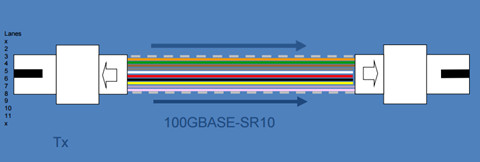
40 GbE links are re-used in this diagram, and require additional MTP/MTP trunk to complete channel, fibers 1 and 12 go dark.
10GBASE-SR, 40GBASE-SR4, 100GBASE-SR10 in Different From Factors
- 10GBASE-SR SFP+
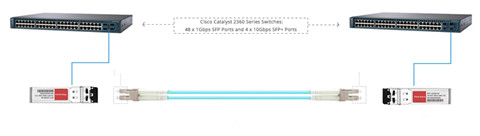
10GBASE-SR optical transceivers uses 10G SFP+ form factor with duplex LC connector. The range of this module depends on the type of multimode used. It generally supports a link length of 26 meters on standard Fiber Distributed Data Interface (FDDI)-grade multimode fiber and can also support link length up to 400 meters over OM4 multimode fiber. The following image shows the simplest solution between two Cisco switches by using the 10GBASE-SR SFP module optics.
- 40GBASE-SR4 QSFP+
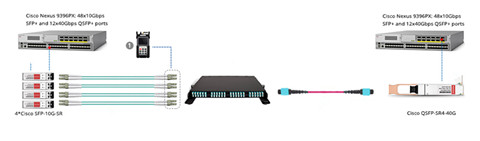
40GBASE-SR4 optical transceiver is QSFP+ form factor, primarily enabling high-bandwidth 40GbE optical links over 12-fiber parallel fiber terminated with MPO/MTP multifiber female connectors. In general, it can support link lengths of 100 and 150 meters, respectively on OM3 and OM4 multimode fibers. In addition, using 12-fiber MPO/MTP to 6 duplex LC or 8-fiber MPO/MTP to 4 duplex LC breakout cable, the 40GBASE-SR4 interface can be divided into four 10GBASE-SR interfaces.
- 100GBASE-SR10 CFP
CFP is the typical representative form factor of 100GBASE-SR10. The 10GBASE-SR10 CFP uses 24-fiber MPO/MTP optical interface, enabling high-bandwidth 100GbE links over 24-fiber ribbon cables terminated with MPO/MTP-24 connectors. Alternatively, 2 x 12-fiber MPO connector interface can be used where one connector is used for Receive while the other for Transmit. The 100GBASE-SR10 CFP can supports link lengths of 100 meters and 150 meters respectively on laser-optimized OM3 and OM4 multifiber cables. Additionally, it can be used in 10 x 10GbE mode along with ribbon to duplex fiber breakout cables for connectivity to ten 10GBASE-SR optical interfaces.
Conclusion
This article concludes the features of multimode cabling upgrade from 10G to 100G. multimode modules together with its lower price tag and low power consumption, are compelling to overall users.
Posted by: angelina at
08:20 AM
| No Comments
| Add Comment
Post contains 674 words, total size 6 kb.
February 27, 2017
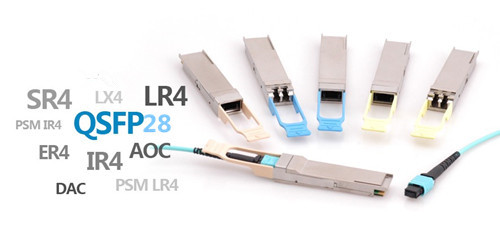
Telecom industry embraces the prosperity of 100G optics market in 2017. With such a bright future, fiber optic market attracts a wide attention, and many vendors want a piece of the pie. The 100G optics like the CFP, QSFP28 modules and cables are varied in different standards. QSFP28 optics, along with its compact size and reliable performances, gradually becomes the mainstream form factors of the 100G optics market. QSFP28 modules come in different standards (LR4, SR4, PSM4, CWDM4), and the QSFP28 AOC and DAC cables are also available for 100G systems. Which one is ideal for your 100G network? This article attached with the detailed information of all the 100G optics, will blew your mind.
QSFP28 DAC Inside Rack: <5 m
QSFP28 passive DAC cables are launched to decrease the cost of 100G systems, which provide a cost-effective I/O solution for 100GbE connectivity within 5 m. QSFP28 to QSFP28 DACs and QSFP28 to 4x SFP28 DACs are the two common types of the QSFP28 DAC cables. QSFP28 to QSFP28 direct attach cable is usually used inside racks with QSFP28 connectors terminated on each end. QSFP28 breakout DACs can achieve 25G to 100G transmission with a QSFP28 connector on one end and 4 SFP28 connectors on the other end. If your 100GbE deployment is within 5m intra racks, the QSFP28 DAC is ideal for you.
QSFP28 AOC: Up to 100 m
The QSFP28 AOC is a cost-efficient, four-channel optical transceiver that conforms to the QSFP28 multi-source agreement. It is capable of delivering 100-Gbps data rates over four lanes of 25 Gbps with a reach of up to 100 m, maximum. Just as the QSFP28 DAC, QSFP28 AOC cable also comes in two types—QSFP28 to QSFP28 AOC and QSFP28 to 4SFP28 AOC. The former one is best fit for 3-20 m, and QSFP28 breakout can support a link length of up to 100 m. The QSFP28 AOC supports InfiniBand EDR and 100 Gigabit Ethernet (100GBase-SR4) transmission speeds and is best for close-range, high-speed transmission in data center networks, such as between servers and server racks.
QSFP28 SR4 Close Range: 5-100 m
For 100GbE cabling with multimode fiber between switches, QSFP28 SR4 with 12-fiber OM4 MTP fiber cable is the perfect choice. It can support reaches up to 100 m over OM4. The 100Gbase-SR4 QSFP28 module achieves four lanes of 25G dual way transmission over eight fibers. QSFP28 SR4 module is compliant with 100GBASE-SR4 standard certificated by IEEE. It is the firstly published 100G standard to support short distance over multimode fibers. Many vendors offer the compatible QSFP28 SR4 optics with good quality and high reliability.

QSFP PSM4 Between Switches: 100 m-500 m
For 100G connectivity, if the reaches are beyond 100m but less than 500m, you can use the QSFP PSM4. Unlike the QSFP28 SR4 optics (by IEEE), PSM4 standard is published by MSA. 100G PSM4 QSFP28 is designed to support a transmission distance up to 500 m over MPOI single-mode multi-fibers.
QSFP CWDM4 Mid-Reach: 500 m-2 km
Reaches less than 2 km are usually called mid-reaches. QSFP28 CWDM4 is the module designed to meet the mid-reach requirements. MSA published 100Gbase-CWDM4 standard for QSFP28 over single-mode up to 2 km over through duplex LC interface. It uses WDM technologies like 100Gbase-LR4. But the transmission distance is shorter and the cost is much lower.
QSFP28 LR4 Long Span: ≤10 km
For long distance transmission between two buildings, the IEEE standard 100Gbase-LR4 is being used in QSFP28 form factor which is known as QSFP-100G-LR4 module. Unlike QSFP-100G-SR4 modules, QSFP-100G-LR4 uses the WDM technologies for four 25G lanes transmission. The four 25G optical signals are being transmitted over four different wavelengths. It has a duplex LC interface for 100G dual-way transmission. 100Gbase-LR4 QSFP28 can support transmission up to 10 km over single-mode fiber. But one problem is that the cost of QSFP28 LR4 is very high now. What’s worse, you would need the EDFA to offset the link loss.
Conclusion
To achieve higher data-rate transmission speed, new network design will work to bring us closer to meet the needs of a Big Data future. This article concludes the features of existing QSFP28 100G products on the market. After going through the whole passage, you must know which one is ideal for your network.
Posted by: angelina at
02:32 AM
| No Comments
| Add Comment
Post contains 714 words, total size 6 kb.
February 15, 2017
In addition to 10 GbE, the telecom market nowadays is also actively deploying 40 GbE connections to support server connectivity, the typical use case is switch-to-switch interconnects. In fact, copper cables is used in some special cases, primarily for switch-to-switch short-reach connections. However, with the majority of 40 GbE connections being optic fiber-based, fiber optic cables, especially the MTP/MPO cables are widely deployed. From a cable plant standpoint, continued investment in fiber parallel-optic technologies will position the physical infrastructure for eventual migration to 100 GbE and beyond. This article will provide available physical cable technologies for 10G and 40G connectivity.
10 GbE Cable Solutions
Higher transmission speeds require us to implement new cable technologies to optimize our 10 GbE infrastructure:
- 10GBASE-T.
This connection over unshielded or shielded twisted-pair cables can support distances over 100 meters (330 feet) with Category 6a cable, 55 meters with Category 6 cable, and 45 meters with Category 5e cable. Category copper cables like cat5e and cat6 cable reel are the most commonly used types. We are using limited 10GBASE-T to serve the high-density connectivity within racks. 10GBASE-T has some cost advantages but it also consumes more power than optical technology.
- Small-Form-Factor Pluggable (SFP+) direct-attach cables.
These twinaxial cables support 10 GbE connections over short distances of up to 7 meters. Some suppliers are producing a cable with a transmission capability of up to 15 meters.
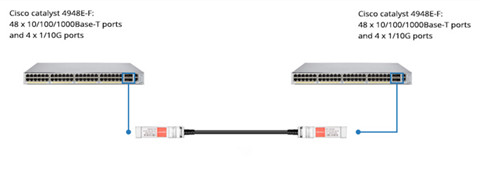
Figure 1 shows a simple and economic sulution for you, just connecting two Cisco Catalyst 4948E-F Switches with a 10G SFP+ Passive Direct Attach Copper Twinax Cable.
- MPO cabling.
We are using this technology to simplify cabling and reduce installation cost because it is supported over SFP+ ports. One trunk cable that we use can support 10 GbE up to 90 meters and provides six individual connections. This reduces the amount of space required to support comparable densities by 66 percent. The trunks terminate on a variety of options, providing for a flexible system.
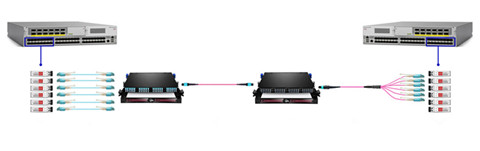
Figure 2 shows the Interconnection for 10-Gbps Connectivity with MTP Multimode Fiber Optic Trunk Cable, 12 Fiber, Polarity B.
We use an MPO cable, which is a connectorized fiber technology comprised of multi-strand trunk bundles and cassettes. This technology can support 1 GbE and 10 GbE connections and can be upgraded easily to support 40 and 100 GbE parallel-optic connections by simply swapping a cassette. The current range for 10 GbE is 300 meters on OM3 MMF and 10 kilometers on SMF.
40GbE Switch-to-Switch Interconnects
A 40 GbE switch-to-switch interconnect can use one of three methods.
- QSFP+ transceivers and MMF MPO trunks.
This configuration must use a Method B polarity MPO trunk.
- Long-range QSFP+ transceiver and standard 2-strand SMF connections.
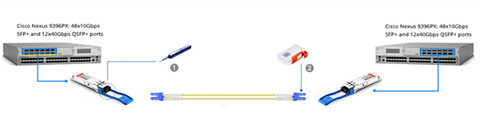
Figure 3 shows two 40G QSFP+ transceivers connected by a single mode LC cable. This configuration is used where switch-to-switch interconnects span between data centers or buildings within a campus.
- Active optical cable.
This is a pre-terminated parallel-optic solution which incorporates a 12-strand MMF bundle connected on each end with a QSFP+ transceiver. This type of cable is available in standard lengths up to 100 meters. This configuration is used for 40 GbE connections that span rows within the data center.
Conclusion
The existing 100Mbps and 1GE connections no longer support growing business requirements, so here comes the era of 10G and 40 GbE data center fabric design. The new fabric will reduce data center complexity and increase our network agility to meet growing data center needs. Today’s article offer the suitable fiber optic solutions for 10G/40G switch to switch interconnects.
Posted by: angelina at
09:16 AM
| No Comments
| Add Comment
Post contains 591 words, total size 6 kb.
February 07, 2017
Many people think that RJ45 to RJ45 connectors are the same as the modular plugs or jacks, but they’re wrong. In most cases, the term plug technically refers to the cable or male end of the connection while the term jack refers to the port or female end. If you have had a misunderstanding about these concept, you probably have experienced problems that were extremely difficult to resolve in your network. Therefore this article will have a brief introduction to the male and female RJ45 connectors.
RJ45 Pinout
RJ45 connector stands for registered jack 45, is most commonly seen with bulk Ethernet cables and network cables. This registered jack specifies the physical male and female connectors as well as the pin assignments. Before we start with the discussion of the male and female RJ45 connector for modular connectors, it is good to know how pins are numbered on RJ45 connectors.
Two standard RJ45 pinouts define the arrangement of the individual eight wires needed when attaching connectors to a cable—the T568A and T568B standards. Both follow a convention of coating individual wires in one of five colors—brown, green, orange, blue and white—with certain stripe and solid combinations.
Following these color scheme is essential when building cables to ensure electrical compatibility with other equipment. T568B has become the more popular standard. The table below summarizes this color coding.
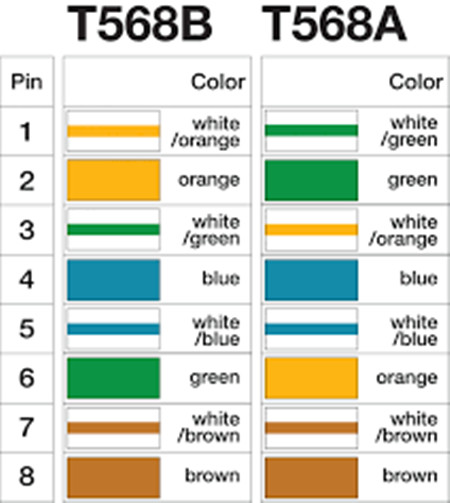
RJ45 cables using RJ45 to RJ45 connectors and cat5/cat6 twisted pair cabling is easy to construct using the correct tools. In particular, RJ45 connectors and cabling standards are simplicity itself as RJ45 only uses four of the eight pins on the connectors. Pins 1 & 2 transmit data, whilst pins 3 & 6 are used to receive data when used in an Ethernet configured data port.
Male and Female RJ45 Connector
RJ45 connector as the modular connector, has gender: plugs are considered as male, while jacks or sockets are considered to be female. Modern Ethernet cables feature small plastic plugs on each end that are inserted into RJ45 jacks of Ethernet devices.
Plugs are used to terminate loose cables and cords, while jacks are used for fixed locations on surfaces such as walls and panels, and on equipment. Other than telephone extension cables, cables with a modular plug on one end and a jack on the other are rare. Instead, cables are connected using a male-to-male adapter, which consists of two female jacks wired back-to-back.
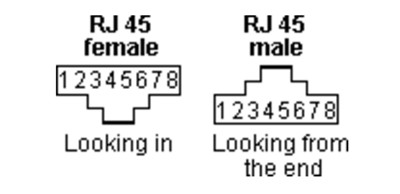
The scheme above shows the exact pin numbering on both male to male and RJ45 female to female connectors. All other modular jacks start counting at the same side of the connector. In the wiring diagrams with modular jacks on this site, we prefer to use a picture of the jack upside down, with the hook underneath.
Female Connector (Jacks) and Male RJ45 Connector (plugs)
Jacks and plugs have very similar packaging even though the functions that they perform are not similar at all. According to different applications, it comes in a wide range of different types from modular connectors and plugs (phone jacks, computer and Ethernet jacks etc.) to Internet connections and electronic components.
Telephone jack, or female to female RJ45 connector, is a very type of modular connector. This small unit is connected to a telephone cord which then transmits a telephone analog signal from a special phone outlet placed on a wall, desk or cubicle to the actual phone unit. An Ethernet jack looks much like a regular phone jack, but it is slightly wider. This port can be used to connect your computer to another computer, a local network, or an external DSL or cable modem. The following image shows the toolless cat5e Keystone Jack.
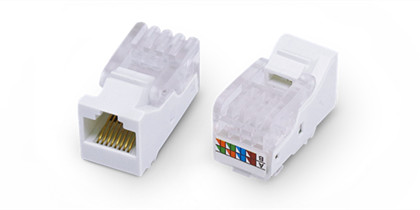
As noted before, male plugs are used to terminate loose cables while female jacks are used for fixed locations. In other words, appliances have cords ending in a male plug, which is fitted into the female outlet. FS.COM RJ45 modular plug use on solid or stranded conductor cat5e cable. These modular plugs are manufactured from polycarbonate to withstand everyday wear and tear, and the contacts are 50 micron gold for optimum signal transmission.
The Common Issue With RJ45 Connectors
A male connector or plugs can be inserted snugly into a receptacle ( female connector ) to ensure a reliable physical and electrical connection. Some RJ45 plugs utilize a small, bendable piece of plastic called a tab to help form a tight connection between a cable and a port on insertion. But it is also the problem of the connector when it snags on another cable. The locking tab is prone to breaking.
Here I’d like to list some tricks to avoid this: Buy the connectors with the locking tab curved down so it avoids the snagging. If you can’t find the cleverly designed connectors use boots to avoid snapping the tabs. Use a good quality crimping tool that doesn’t press on the tab when you crimp the connector.
All in all, crimping a RJ45 to RJ45 connector is not easy. The operation requires dexterity attention and training. If you want to make your life easier, you can use wire guides that come with some packages. Practice a lot and you won’t need the guides.
Posted by: angelina at
09:12 AM
| No Comments
| Add Comment
Post contains 870 words, total size 7 kb.
February 04, 2017
There are a dizzying number of bulk Ethernet cable type available on the market, corresponding to a array of standards detailing the configuration and performance specification needed to support the increasingly faster data rates and larger bandwidths of incoming technologies. Of which stranded and solid Ethernet cables are the commonly used cable types when purchasing bulk Ethernet cable. These two different types refer to the internal conduction inside the bulk Ethernet cable. Today’s article provide the detail information about these two copper network cables.
Stranded and Solid Ethernet Cable
Stranded Ethernet cable has multiple smaller strands of wires that are twisted together to form a single conductor. And a solid Ethernet cable is just fabricated with a single solid strand of copper for each of the 8 conductors. Figure 1 shows the inner structure of the stranded and solid Ethernet cable.
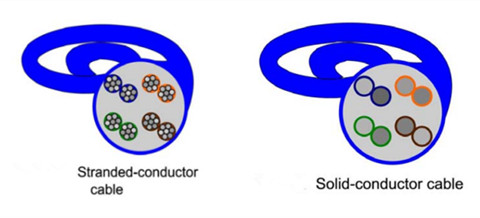
From the above picture, we can see that each of the conductors inside a solid Ethernet cable is made up of a single, solid conducting wire with diameters between 22 and 24 AWG. Take cat6 bulk cable as an example, it employs the larger 23 AWG copper wires, which makes it better suited to new and emerging fast Ethernet applications (than cat5 bulk Ethernet cable). However, owing to the fragility of their conducting wires, the solid Ethernet cables are well-packed inside a strong outer sleeves that resists bending making them less flexible and not well suitable to normal everyday use in connecting work area component.
However, stranded Ethernet cable is the one that we most often work directly with. Unlike the solid Ethernet cable, the stranding of the wire conductors serves to protect them, and provide stranded cables their flexibility. For a given conductor length, the more times each strand twists around the central conductor, the better the protection and greater the overall flexibility of the cable. Because of their internal difference, each of the cable types might be suitable for a specified situation.
Choosing for Backbone and Horizontal Cabling
Installing any bulk Ethernet cable type (solid or stranded Ethernet cable) into a building’s structure should be well managed by keeping long-term applications in mind. Solid Ethernet cabling with its superior electrical performance and longer runs makes it more suitable for permanent building installations. Additionally, its stability over higher frequencies means that longer time periods are possible between cable reinstallations, and its comparative frailty is not a problem when it is protected from damage by the building itself. Since solid Ethernet cable is most often used for these permanent cabling applications, it often referred to as network cable.
For horizontal cabling, solid Ethernet cables are also used spanning the distances between telecommunications rooms and work areas. In addition to performing better over long distances and at higher frequencies, the single, larger conducting wires of solid cables are much easier to terminate than the multiple fine wires of stranded conductor cables. Also, the relative stiffness of solid cable makes it preferable for use with punch down connectors on the backs of wall jacks. In contrast, the softness and flexibility of stranded Ethernet cables make working with punch down connectors or IDCs (Insulation Displacement Connectors) very difficult.
In conclusion, there is very little difference between the electrical performance of solid and stranded cables for very short lengths (below 10 meters). In modern hierarchical wiring schemes, the length limitations of stranded cables are easily met (3 m, or 9.8 ft), and the increased flexibility and durability of stranded cables make them perfectly suited for interconnecting work area outlets with workstation PCs and other end-user devices.
However, solid cables are far too fragile for frequent bending and handling, and far too difficult to manage in connecting closely spaced components. The conductors inside a stranded cable are protected by the wire strands surrounding them, so that very little of the conducting surface area is exposed to damage if the cable is accidentally cut or smashed, and the conductor is not weakened by repeated flexing and bending. Without this protection, the conducting surfaces within a solid-conductor cable are more susceptible to nicks or other irregularities that affect transmission performance and often accompany their early demise.
Conclusion
As we move toward increasingly faster Ethernet systems, the copper transmission medium would require increasingly faster frequencies and data rate. For solid and stranded cables, the differences seen in electrical activity are very little. FS.COM offers a full range of bulk Ethernet cables including the cat5 bulk cables, cat6 bulk cables, cat7 bulk cables, and copper cable assemblies.
Posted by: angelina at
09:24 AM
| No Comments
| Add Comment
Post contains 758 words, total size 6 kb.
January 06, 2017
When DIY a home network, besides the common problems (written in the previous article "Do It Yourself for Your Home Networkâ€), people often feel puzzled about what I should use for my jacks—inline coupler or punch down keystone jack. The first one is easy to install but adds an extra connection to the network. The last one is more cheaper and needs a punch down tool to complete the installation. Today’s article will continue to illustrate the technical differences between them, please read on.
What Is Inline Coupler?
Before we come to the comparison between inline couplers and keystone jacks, let’s have a brief overview of these two jacks. A small device for connecting two cables to make a linger cable, usually called an inline coupler or RJ45 coupler. Inline couplers do not provide any amplification or signal boost, and can cause attenuation and signal degradation unless they are of high quality. There are cat5e and cat6 RJ45 inline couplers available on the market.
Figure 1 shows the Cat5e RJ45 inline coupler (orange). This Cat5e Coupler offers a practical, cost-effective solution for joining two RJ45-terminated cables together to form one long cable.
What Is a Keystone Jack?
Keystone jacks are the standardized snap-in packages for mounting a variety of low-voltage electrical jacks or optical connectors into a keystone wall plate, faceplate, surface-mount box, or a patch panel. As displayed in the Figure 2, keystone jacks have a rectangular face of 14.5mm wide by 16.0mm high and are held in place with flexible tabs. This allows them to be snapped into a mounting plate with correspondingly-sized rectangular holes, called ports.
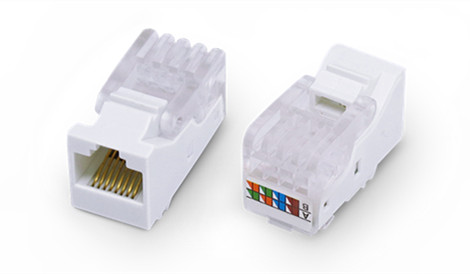
All keystones, regardless of the type of jack they carry, are interchangeable and replaceable. This provides much flexibility in arranging and mounting many different types of electrical jacks in one plate or panel without requiring customized manufacturing.
Some keystones use a pass-through type connector, where there is a jack on both the front face as well as the rear side. Others only have a jack on the front and employ a different mechanism for hard-wiring signal cables to the rear, such as a mini 110 block, an insulation-displacement connector, or a crimp or solder connection.
Whether Should I Use Inline Coupler or Punch Down Keystone Jacks
If you go with inline couplers, you should be aware that they might work well but can turn flaky for a while owing to the plug oxidation or loose fit. RJ45 couplers are easy to install, but they probably will increase the line resistance of the whole total cable length slightly which would decrease the max length of the allowed run (from ~328 feet for 100mb and ~300 feet for gigabit on cat5e by 10-20ft per coupler/patch). However, this will not have any noticeable affect on network performance for a home network unless you are on the limits of the specs.
Note: If you have speed certified network (probably not at home, but possibly in a high-tech office) then you are not allowed to use couplers.
Punch down keystone jack is usually cheaper than the RJ45 coupler, but more difficult to install. As the punch down is more prone to human error, so not only is it hard to install, but if you have issues, it'll also be hard to reinstall. Therefore, the toolless keystone jacks have been introduced on the market, which make for a simple installation without the need for a punch down tool. Of course, the price is much higher than that of the Punch down keystone jack.
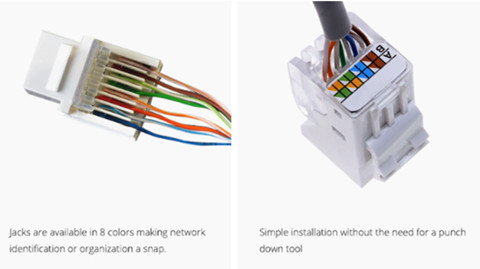
Figure 3 shows the cat6 toolless keystone jacks.
To sum up, if all the connectors are done right, there are really no any obvious differences in signal whether you use the Inline couplers or punch down keystone jacks for connection. It's all a question of how reliable the physical connections can be. However, sometimes the couplers can have issues inside the cube where they just stop working over time. You'd then have to replace it, which indeed will be a faster replacement than a punch down. But after its replaced, things should be back to normal.
Conclusion
Keystones jacks are quite versatile and can be mounted easily into a wall plate. While inline couplers also play an important role in the overall system. If you are planning on expanding your home network in the next few years, you should know which type of the jacks that allow you to connect the devices safely and securely. FS.COM offers cost-effective RJ45 couplers and toolless keystone jacks such as cat5e coupler, cat6 coupler, cat5e toolless Keystone Jack, cat6 toolless Keystone Jack, etc.
Posted by: angelina at
02:48 AM
| No Comments
| Add Comment
Post contains 772 words, total size 6 kb.
43 queries taking 0.04 seconds, 128 records returned.
Powered by Minx 1.1.6c-pink.

